
Best VPS for Open WebUI in 2026: Self-Hosting & Server Requirements
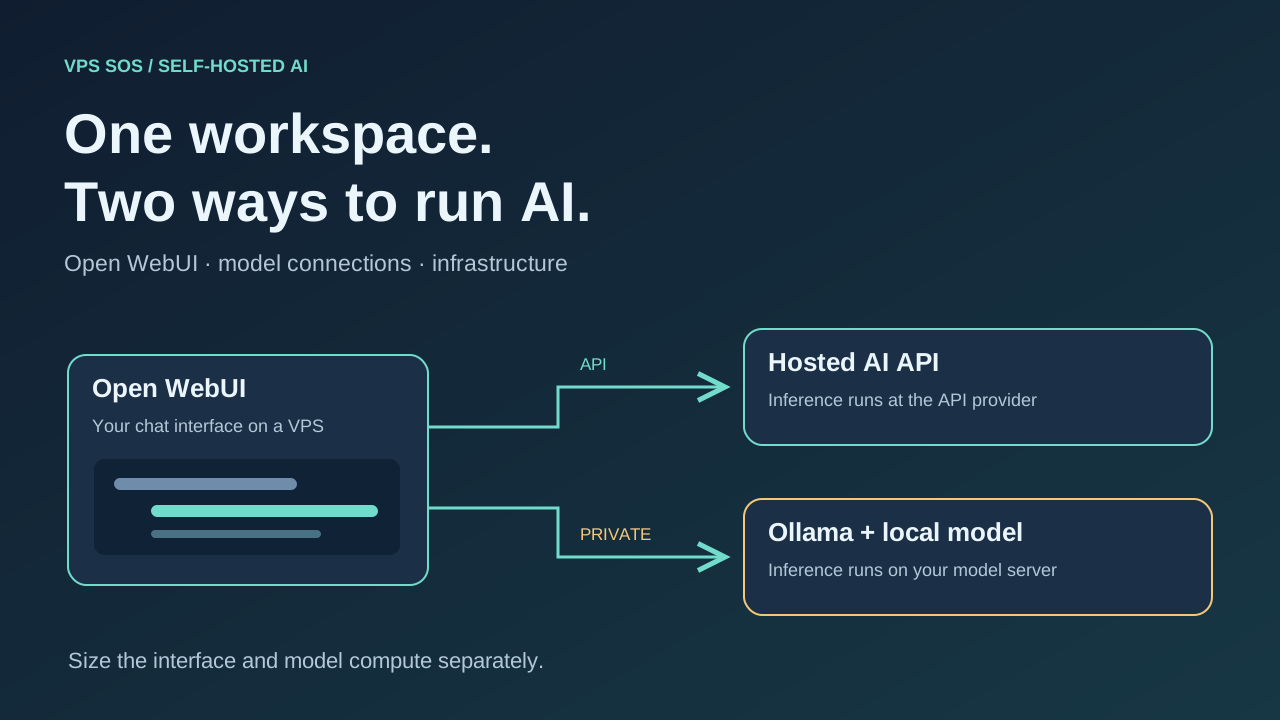
The best VPS for Open WebUI depends on where your AI models run. Open WebUI is a self-hosted AI chat interface that gives you a browser workspace, saved conversations, document tools, and connections to model providers. Hosting it on a VPS lets you reach that workspace across devices and manage access for a small team.
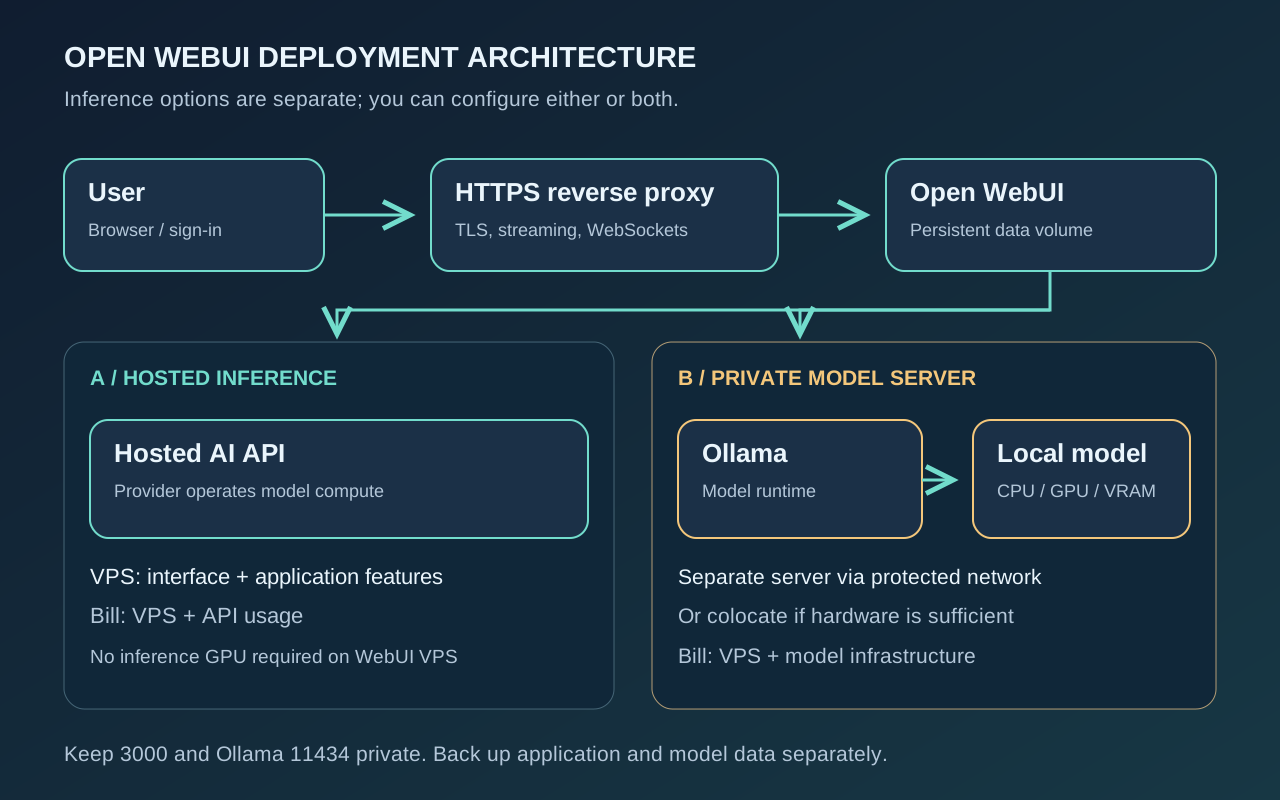
With a cloud AI API, the VPS serves the interface while the provider performs inference. With Ollama and downloaded models, your own model server supplies the compute, memory, and potentially GPU resources. Installing the interface alone does not give a small server large-model inference capacity.
This guide compares LightNode, Hetzner, DigitalOcean, Vultr, Akamai Cloud, and Contabo, then walks through Docker deployment. Start by deciding who runs inference; compare CPU, RAM, storage, traffic, recovery options, and the separate model bill afterward.
Checked October 26, 2026. Official sources and editorial capacity planning; no purchased-server benchmarks. Latest verified release: v0.12.4. Prices depend on location, tax, inventory, and order terms.
Best VPS for Open WebUI: Quick Comparison
These recommendations host the interface and API connections. GPU products are separate purchases. Unknown quotes are deliberately left unpriced.
| Provider | Recommended Configuration | vCPU | RAM | Storage | GPU Availability | Verified Monthly Price | Billing Model | Best For |
|---|---|---|---|---|---|---|---|---|
| LightNode | Agency Linux | 2 | 4 GB | 50 GB NVMe | No ordinary-VPS GPU verified | $14.70 displayed equivalent | Hourly, capped per FAQ | Flexible trials |
| Hetzner | CPX22, stock-dependent | 2 | 4 GB | 80 GB NVMe | Separate dedicated GEX45 | Check current pricing; EU reference €19.49 before IPv4/VAT | Hourly, monthly cap | EU developer projects |
| DigitalOcean | Regular Basic 4 GiB | 2 | 4 GiB | 80 GiB SSD | Separate GPU Droplets | $24 | Per-second, monthly cap | First cloud deployment |
| Vultr | vc2-2c-4gb | 2 | 4 GB | 80 GB SSD | Separate Cloud GPU | $20 base; São Paulo $30 | Hourly, monthly cap | Regional placement |
| Akamai / Linode | Linode 4GB | 2 | 4 GB | 80 GB SSD | Separate GPU instances | $24 base; regional overrides | Hourly, monthly cap | General Linux hosting |
| Contabo | Cloud VPS Plus 4 | 4 shared | 8 GB | 150 GB NVMe | Separate GPU VPS | Check current pricing | Contract/term-dependent | Memory and disk capacity |
Sources: LightNode plans, Hetzner plans and price adjustment, DigitalOcean, Vultr plan API, Linode type API, Contabo specifications and pricing.
Entry price is a different comparison. LightNode lists $7.71 for 1 vCPU/2 GB; DigitalOcean starts at $4/512 MiB; Nanode at $5/1 GB. These are below our preferred 2 vCPU/4 GB starting configuration. Hetzner's cheapest inventory and Contabo's localized checkout need confirmation. See our cheap VPS guide for broader budget choices.
What Is Open WebUI?
Open WebUI connects a self-hosted workspace to Ollama, OpenAI-compatible APIs, and other supported model connections. Chat history, uploads, retrieval-augmented generation (RAG), user management, and model selection live around that connection. Features may need additional embedding, extraction, or speech services; see the official features guide.
Open WebUI is the interface; Ollama is a model-serving runtime. A hosted API moves inference to another organization. Downloading a local model moves its resource requirements onto your model server. One interface can use both, but choosing a cloud model sends the prompt and included context to that provider. A self-hosted interface alone does not make every connected service private.
Open WebUI Server Requirements
The following are editorial starting points for evaluation, not official minimums or concurrency guarantees.
| Workload | CPU / system RAM to evaluate | Storage / GPU planning |
|---|---|---|
| Cloud API chat only | 2 vCPU / 2–4 GB; prefer 4 GB headroom | Evaluate 30–50 GB SSD; no inference GPU |
| API plus document/RAG work | 2–4 vCPU / 4–8 GB | Allow upload/index growth; local embedding workloads add compute |
| Small local models plus WebUI | Size against the exact model, quantization, context, and concurrency | Model files plus runtime memory; test before committing |
| GPU local inference | Model-dependent RAM and CPU alongside GPU | Fit weights, KV cache, and runtime overhead into available VRAM |
CPU and RAM
For cloud API users, CPU handles application work rather than the provider's token generation. Document parsing and concurrent uploads can create memory spikes. Leave room for Ubuntu, Docker, the proxy, and monitoring. Shared vCPUs suit intermittent work; sustained local inference warrants checking CPU generation, instruction support, dedicated-core options, and acceptable-use terms.
Storage and Persistent Data
Use SSD/NVMe and keep free space for image pulls, logs, database growth, documents, and backups. Mount /app/backend/data persistently. Ollama's model directory needs separate persistence. Multiple quantizations and retained image versions can consume much more disk than the interface itself.
GPU Requirements
Ordinary VPS plans usually have no GPU. Hosted inference does not require one on the WebUI host. Local NVIDIA inference requires a compatible GPU, sufficient VRAM, host drivers, and container support. System RAM cannot directly replace VRAM; partial CPU offloading changes the execution path and must be evaluated.
Requirements for Cloud API Users
Budget for the application and optional RAG services locally; model computation is charged by the API provider. The standard image includes local feature dependencies. The slim variant targets chat through external services and needs external components for several document, embedding, and voice workflows. Choose by features, not image size alone; check the image variants.
Requirements for Local LLM Inference
Account for parameters, quantization overhead, context length, KV cache, concurrent requests, runtime, and model architecture. Ollama's context guide explains why longer contexts increase memory consumption. Preserve memory for WebUI and the OS beyond model weights. A 2, 4, or 8 GB VPS is not a universal local-LLM recommendation.
6 Best VPS Providers for Open WebUI in 2026
All six offer Linux infrastructure with administrative/SSH access suitable for a manual Docker deployment. None of the ordinary VPS configurations below includes inference acceleration.
1. LightNode – Best for Flexible Hourly VPS Hosting
LightNode hourly VPS fits API-backed personal chat, development, and short regional trials. Evaluate Agency's 2 vCPU/4 GB/50 GB NVMe at the displayed $14.70 monthly equivalent, with 2 TB transfer. Premium offers 4 vCPU/8 GB at $27.70 if document tasks need more headroom.
Strengths include Linux, root access, multiple configurations, and locations across Asia, the Middle East, Europe, and the Americas. The dedicated-IP page lists a static dedicated address; confirm the selected order's IP and traffic terms. Install Docker and WebUI yourself; no dedicated Open WebUI image is claimed.
The billing FAQ describes hourly billing with a 672-hour server-fee cap within a calendar month. Stopped instances remain billable. Confirm the actual hourly quote, transfer overage, and snapshot/backup charges in the console; public backup pricing was not verified. No suitable LightNode GPU product was verified, so local large-model inference is outside this recommendation.
2. Hetzner – Best for EU Developer Projects
CPX22 supplies 2 vCPU/4 GB/80 GB NVMe for an API frontend. Its published Germany/Finland reference is €19.49 before VAT and IPv4; Primary IPv4 adds €0.50/month. Stock restrictions prevent treating that as a guaranteed available quote. EU plans include at least 20 TB; Singapore allowances differ. Cloud locations include Germany, Finland, the US, and Singapore.
Strengths are Linux tooling and private networking. Limitations are inventory and regional economics: it is no longer safe to assume every current plan is the cheapest. Backups cost 20% of server price; snapshots are separately metered. Local inference needs separate sizing: the GEX45 dedicated server has RTX PRO 4000 Blackwell SFF with 24 GB VRAM. It is not a cloud VPS; check current pricing and setup fees.
3. DigitalOcean – Best for Beginner-Friendly Cloud VPS
Regular Basic 2 vCPU/4 GiB/80 GiB SSD is $24/month with 4,000 GiB transfer. Broad documentation and a conventional Droplet workflow make it an approachable API host across multiple Americas, European, and Asia-Pacific regions. Public IPv4 is part of ordinary Droplet networking; additional networking products have separate terms.
The limitation is paying for services beyond compute: percentage-based backups add 20% weekly or 30% daily; Droplet snapshots cost $0.06/GB-month. Ordinary Droplets are CPU-only. A separately priced RTX 4000 Ada GPU Droplet lists 20 GB VRAM, 8 vCPU, 32 GiB RAM, and $0.76/GPU-hour. GPU billing is per-second with a five-minute minimum and no ordinary monthly cap; regional stock still matters.
4. Vultr – Best for Regional VPS Options
The official API lists vc2-2c-4gb: 2 vCPU/4 GB/80 GB SSD, 3,072 GB transfer, $20/month or $0.027/hour base. São Paulo overrides that to $30/$0.041. Its many listed regions make placement useful when WebUI and a remote model server need a sensible network path.
Cloud API hosting is the primary fit. Strengths are location choice and standard Linux administration; limitations include regional pricing and shared CPU variability. Verify IPv4 and transfer terms. Automatic backups add 20% of instance cost; check the separate snapshot-storage quote.
Cloud GPU is separate. The GPU plan API lists L40S/48 GB VRAM at $1.671/hour with 16 vCPU/180 GB RAM. Its location list was empty when checked: that is a catalog reference, not verified purchasable capacity. Check current pricing and regional availability before choosing local inference.
5. Akamai Cloud – Best for General-Purpose VPS Hosting
Linode 4GB provides 2 vCPU/4 GB/80 GB SSD and 4,000 GB transfer for $24/month or $0.036/hour. The API lists Jakarta at $28.80 and São Paulo at $33.60. Base backups add $5/month, with regional overrides. Standard public IPv4 networking and Linux administration suit an API frontend or a frontend connected privately to another model host.
Strengths are a familiar VM model and regional options; limitations are shared CPU and extra recovery costs. Egress overage is $0.005/GB in most regions, with different distributed-region terms. GPU instances are separate: RTX 4000 Ada has 20 GB VRAM per card. Pricing lists $0.52/hour and a $350 monthly reference; the live GPU type API returns no monthly cap, so confirm billing and stock before ordering. New RTX PRO 6000 Blackwell/96 GB capacity is request-access, not unrestricted inventory.
6. Contabo – Best for RAM-Focused Configurations
Cloud VPS Plus 4 offers 4 shared AMD EPYC vCPU/8 GB/150 GB NVMe and a 500 Mbit/s port. This is useful capacity to evaluate for API plus document workloads. Specifications list five snapshots for Performance VPS and optional Auto Backup. Traffic is advertised unlimited subject to fair use, not guaranteed unlimited sustained throughput.
The limitations are shared compute and checkout-dependent total cost: Check current pricing, including term, setup, location, renewal, tax, and backup charges. Confirm the included static IPv4 and chosen region; CPU locations span Europe, the Americas, and Asia.
The separate GPU VPS specifies RTX PRO 6000 Blackwell Server Edition/96 GB VRAM, 18 vCPU/96 GB RAM/900 GB NVMe in EU and US Central. Its current quote needs checking; Auto Backup is unavailable on that GPU product. This is a distinct local-inference option, not a feature of Plus 4.
Open WebUI VPS Hosting Costs
Separate the three architectures before comparing totals:
| Scenario | VPS / infrastructure | Model bill | Other costs |
|---|---|---|---|
| A: WebUI + hosted API | Example: $14.70 LightNode equivalent or $24 DigitalOcean | Provider/model input and output tokens, plus feature charges | Backup, domain, egress, administration |
| B: WebUI + remote Ollama | Frontend VPS plus separate model server | No hosted-token fee for purely local inference | Model hardware rental or ownership, storage, private connectivity, backups |
| C: WebUI + local GPU | GPU host, optionally separate frontend | No hosted-token fee for purely local inference | Persistent disk, backup, egress, administration |
For example, $24 DigitalOcean plus weekly percentage backups is $28.80 before API usage, domain, tax, and other extras. At $0.76/hour, 100 GPU hours cost $76, and an assumed 730 hours cost $554.80; these are arithmetic illustrations, not monthly GPU quotes. Stopping a retained GPU Droplet does not end billing.
API cost depends on model, input/output tokens, caching, and tools; there is no universal API monthly allowance. Owned local hardware also incurs electricity, cooling, depreciation, and maintenance. Hosted hardware incorporates those into rental economics. Include storage for model downloads, document retention, off-site recovery, and your operating time.
How to Install Open WebUI on an Ubuntu VPS
Use a fresh Ubuntu 24.04 LTS amd64 or arm64 VPS. Open WebUI supports Linux x86_64/ARM64; select compatible images and model runtimes. This is a single-instance Docker setup, adapted from the official quick start.
1. Connect and install Docker Engine
SSH using your provider-issued address and authorized key:
ssh ubuntu@YOUR_SERVER_IP
free -h
df -h /
uname -m
Follow Docker's Ubuntu prerequisites, resolving conflicting packages on an existing server first. On a clean host, add the official repository:
sudo apt update
sudo apt install -y ca-certificates curl openssl
sudo install -m 0755 -d /etc/apt/keyrings
sudo curl -fsSL https://download.docker.com/linux/ubuntu/gpg -o /etc/apt/keyrings/docker.asc
sudo chmod a+r /etc/apt/keyrings/docker.asc
sudo tee /etc/apt/sources.list.d/docker.sources > /dev/null <<EOF_DOCKER
Types: deb
URIs: https://download.docker.com/linux/ubuntu
Suites: $(. /etc/os-release && echo "$VERSION_CODENAME")
Components: stable
Architectures: $(dpkg --print-architecture)
Signed-By: /etc/apt/keyrings/docker.asc
EOF_DOCKER
sudo apt update
sudo apt install -y docker-ce docker-ce-cli containerd.io docker-buildx-plugin docker-compose-plugin
sudo docker run --rm hello-world
2. Save a stable secret and start the application
Create this protected configuration once. Reuse it when recreating containers; never commit it or API keys to Git. Replace the example domain before running:
sudo install -m 0700 -d /etc/open-webui
sudo sh -c 'umask 077; test ! -e /etc/open-webui/webui.env && {
  printf "WEBUI_SECRET_KEY=%s\n" "$(openssl rand -hex 32)"
  printf "WEBUI_URL=https://chat.example.com\n"
  printf "CORS_ALLOW_ORIGIN=https://chat.example.com\n"
} > /etc/open-webui/webui.env'
sudo docker volume create open-webui
sudo docker run -d \
  -p 127.0.0.1:3000:8080 \
  --env-file /etc/open-webui/webui.env \
  -v open-webui:/app/backend/data \
  --name open-webui --restart unless-stopped \
  ghcr.io/open-webui/open-webui:v0.12.4
sudo docker logs --tail 80 open-webui
curl -fsS http://127.0.0.1:3000/health
The standard pinned image supports the feature set discussed here. :main follows current builds; :slim, :cuda, and :ollama serve different needs. A CUDA WebUI image does not give a separate Ollama container GPU access automatically.
3. Claim the admin account and enable HTTPS
Before public access, tunnel from your computer:
ssh -L 3000:127.0.0.1:3000 ubuntu@YOUR_SERVER_IPOpen http://localhost:3000, register the first administrator, then disable open registration in admin settings. Point the domain's DNS at the VPS. Install Caddy on the host using its official package instructions; configure /etc/caddy/Caddyfile:
chat.example.com {
    reverse_proxy 127.0.0.1:3000 {
        flush_interval -1
    }
}
Validate with sudo caddy validate --config /etc/caddy/Caddyfile, then reload Caddy. Permit public TCP 80/443 and restrict SSH at the provider firewall. Keep 3000 and 11434 private. Docker-published ports can bypass UFW rules, which is why this example binds WebUI to loopback. See Open WebUI's Caddy guide for streaming and proxy details.
Connect a model, send a test chat, upload a harmless test document, restart the container, and confirm history and uploads survive. These are verification steps to perform on your VPS, not claimed results of this article.
How to Connect Open WebUI to an AI Model
Connect a Hosted API
In Settings → Admin → Connections, add a supported provider connection with its documented base URL and API key. Use the provider's compatible endpoint, often including /v1; a consumer chat subscription does not necessarily include API credit. Verify model access and outbound HTTPS. Use the provider-specific guides, then select a model and test.
Connect Ollama on the Same VPS
A separate Docker network avoids exposing Ollama's port. Only proceed after sizing the model host:
sudo docker network create ai-backend
sudo docker network connect ai-backend open-webui
sudo docker run -d --name ollama --restart unless-stopped \
  --network ai-backend -v ollama:/root/.ollama ollama/ollama
Set the Ollama connection URL to http://ollama:11434 in admin connections. Download your selected model using sudo docker exec -it ollama ollama pull MODEL_TAG, replacing MODEL_TAG after reviewing its model card. Container localhost refers to that container, not the other service. Preserve this network attachment on WebUI recreation. The Ollama Docker guide covers GPU variants; NVIDIA needs compatible drivers and Container Toolkit, with --gpus all on the inference container.
Connect Ollama on a Separate Server
Use a private VPN/network address reachable from the WebUI container, or an authenticated TLS reverse proxy. Configure the Ollama connection with that address; OLLAMA_BASE_URL is an available environment setting. Saved admin settings may override environment defaults. Never expose unauthenticated port 11434 publicly. Restrict model-server ingress to authorized peers and test from the actual container network.
Can You Run Local LLMs on a VPS?
Yes, when its hardware fits the selected model and workload. CPU-only inference can be useful for experiments, but shared vCPU counts do not establish interactive speed. Quantization reduces weight storage and memory, with quality and runtime trade-offs. Longer contexts and concurrent users add KV-cache and execution memory; weights fitting alone is insufficient.
For a weight-only estimate, parameters × bits ÷ 8 gives raw bytes before metadata, cache, and runtime allocations. It is not a model's hardware requirement. Check the exact model card, quantization format, runtime support, and actual allocation. Use ollama ps to inspect CPU/GPU placement, and test representative contexts and concurrent requests before renting a long-term server. Our Ollama and Qwen deployment article explores a separate model-serving workflow.
Open WebUI vs Other Self-Hosted AI Interfaces
| Interface | Model provider support | Local integration | Documents / RAG | Deployment and resources | Best for |
|---|---|---|---|---|---|
| Open WebUI | Hosted APIs and supported protocols | Ollama and compatible servers | Uploads, knowledge/retrieval tools | One application container initially; feature services and inference add requirements | Mixed local/cloud chat |
| LibreChat | Multiple providers and custom endpoints | Ollama through custom endpoints | File handling and optional RAG services | Docker stack includes database/services; size the whole stack | Configurable provider/agent workflows |
| AnythingLLM | Cloud and local provider integrations | Ollama and other local engines | Document workspaces, embedding/vector configuration | Self-hosted Docker; local inference needs separate capacity | Document-centered workspaces |
Check LibreChat documentation and AnythingLLM documentation against your required features. These are workflow differences, not performance rankings; resource use depends on enabled components.
Security and Maintenance
Use HTTPS, strong administrator credentials, restricted registration, appropriate user permissions, and spending limits on model keys. Review tools/plugins before enabling code execution. Retain the stable WEBUI_SECRET_KEY; protect secrets and backups outside Git. Configure the documented environment settings deliberately, and review deployment hardening before adding users.
For a consistent default SQLite/local-files backup, stop writes and archive the volume:
sudo install -m 0700 -d /var/backups/open-webui
sudo docker stop open-webui
sudo docker run --rm -v open-webui:/data:ro \
  -v /var/backups/open-webui:/backup alpine \
  sh -c 'tar czf /backup/openwebui-$(date +%Y%m%d-%H%M%S).tar.gz -C /data .'
sudo docker start open-webui
Check archive integrity, encrypt an off-site copy, and securely back up the environment file. External databases, vector stores, and object storage require their own consistent backups. Restore into a new empty volume and test privately with the matching image/secret before switching over.
For updates, review release notes, back up first, pull a chosen version, and recreate the container with the same environment, ports, network, and volume. A restart alone does not update an image. Database migrations can prevent simple image rollback; retain the pre-upgrade backup. Follow the update and recovery guide.
Common Open WebUI Problems
Start with these read-only checks; redact private content before sharing logs:
sudo docker ps -a
sudo docker logs --tail 100 open-webui
sudo docker stats --no-stream
sudo docker inspect -f '{{.State.OOMKilled}}' open-webui
sudo docker inspect -f '{{json .Mounts}}' open-webui
free -h
df -h /
curl -fsS http://127.0.0.1:3000/health| Symptom | Diagnostic direction |
|---|---|
| Page unavailable | Check container state, loopback health, DNS, proxy, and provider firewall |
| Container restarting | Check logs for initialization, permissions, secret/configuration, or disk errors |
| Cannot connect to Ollama | Check model availability, connection URL, Docker network/VPN, bind address, and access rules |
| API authentication fails | Check provider URL, active key, account credit, and model entitlement without printing the key |
| Out of memory | Check OOM state and concurrent extraction/model jobs; reduce workload or increase capacity |
| GPU not detected | Run nvidia-smi on the model host; check drivers, Toolkit, GPU allocation, and Ollama placement |
| Uploaded files disappear | Confirm the same persistent volume and external storage configuration were reattached |
| Reverse proxy failures | Check HTTPS origin, WebSocket upgrades, streaming buffering, and response timeouts |
Which VPS Is Best for Open WebUI?
For cloud API chat and hourly experiments, LightNode Agency is a practical starting candidate. DigitalOcean suits readers who value documented cloud workflows; Akamai offers a conventional alternative. For remote Ollama, choose a frontend region with a protected network path to the existing model host. Vultr merits a regional quote; Hetzner merits an EU stock/price check.
For local CPU inference, evaluate dedicated CPU and model memory rather than choosing the cheapest interface host. Contabo's RAM-focused configurations warrant testing, not a speed promise. For GPU inference, compare actually available DigitalOcean, Akamai, Contabo, or Hetzner GPU products; require confirmed GPU model, VRAM, runtime compatibility, and full cost before ordering.
If deploying several services, our n8n hosting guide, Coolify guide, Dokploy guide, and Docker VPS comparison explain adjacent workloads. Their containers, builds, and databases need additional capacity.
Frequently Asked Questions
What is the best VPS for Open WebUI?
Choose by inference location. LightNode suits hourly API-backed hosting; DigitalOcean suits guided cloud setup. Local models require a separately sized CPU/GPU host.
How much RAM does Open WebUI need?
Evaluate 2–4 GB for basic API chat, preferably 4 GB headroom; document workloads may need 4–8 GB or more. These are planning suggestions, not official minimum guarantees.
Does Open WebUI require a GPU?
No for hosted API chat. Local embeddings, speech, or model inference may benefit from or require acceleration depending on the selected components.
Can I run Open WebUI without Ollama?
Yes. Connect a supported hosted API or another compatible model server.
Can I use Open WebUI with cloud AI APIs?
Yes. Configure a compatible endpoint and key in admin connections, and verify billing and data-handling terms with that provider.
Can I host Open WebUI on a cheap VPS?
Yes for a modest API-backed workload with adequate memory, disk, and recovery. A low advertised entry price is not proof it fits your features.
How much does Open WebUI hosting cost?
The compared frontend examples include $14.70 equivalent and $24/month, before separate model usage, backups, domains, tax, and other extras.
Can Open WebUI run local LLMs?
It connects to a runtime such as Ollama that runs them. Hardware and model availability belong to that runtime's host.
Is Open WebUI free to self-host?
The software is available for free self-hosting subject to its license and branding conditions. Infrastructure, model services, and optional commercial arrangements cost separately.
How do I back up Open WebUI data?
Back up the persistent data volume consistently, retain the secret/configuration securely, and cover external stores separately. Test restoration before relying on the backup.
Start with an API-connected VPS when you want a shared interface without operating inference hardware. Keep an existing Ollama server separate when it already meets your model needs. Choose a GPU server only after the exact model, context, concurrency, and recovery budget justify it.