
Best VPS for n8n Self-Hosting in 2026: 6 Providers Compared
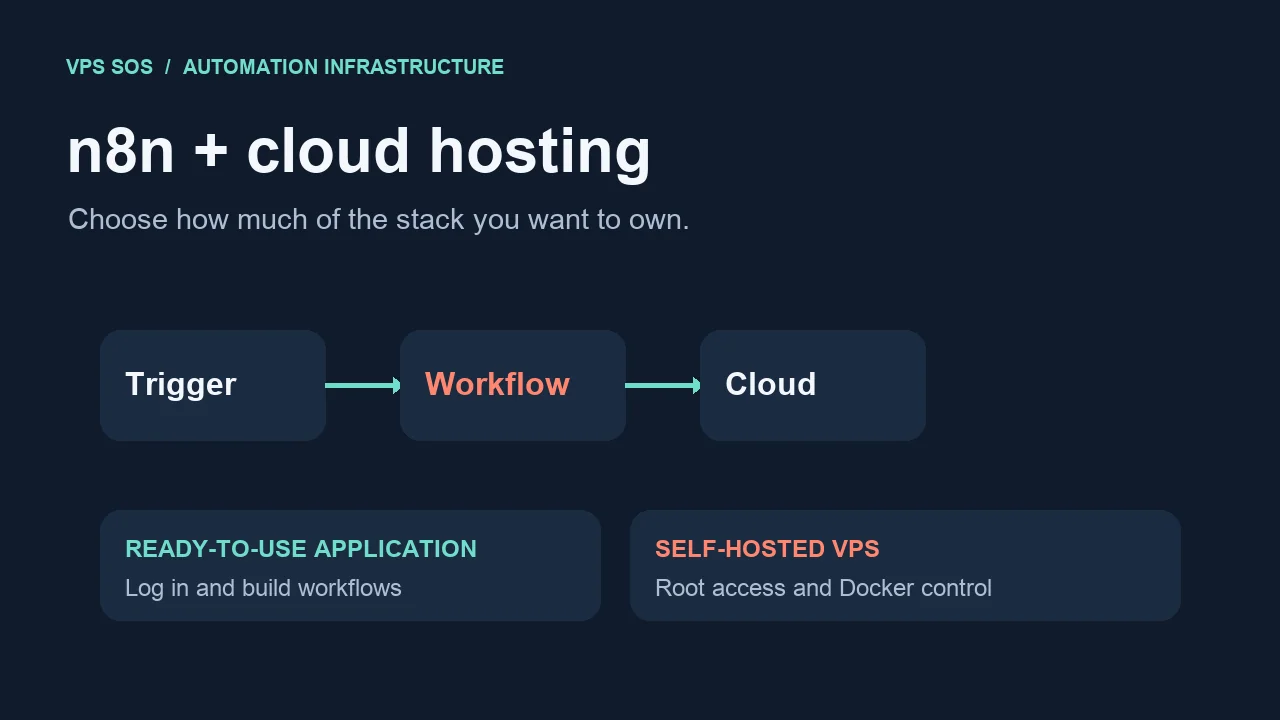
The best VPS for n8n depends on whether you want to build workflows immediately or manage the server yourself. A pre-installed hosted application removes deployment work; a general-purpose VPS gives you root access, Docker control, and responsibility for maintenance.
LightNode offers both: its n8n Application is ready to use, while its n8n VPS supports a custom server environment. Hetzner, DigitalOcean, Vultr, Akamai Cloud, and Contabo are infrastructure alternatives for users comfortable administering Linux. Start with the comparison below, then use the deployment guide that matches your access level.
Editorial scope: Official public sources checked October 19, 2026. These are published specifications and documentation, not purchased-server benchmarks. No measured performance or uptime ranking is implied. Availability and checkout totals can change.
Best VPS for n8n: Quick Comparison
Starting prices refer to each provider's stated entry offer, not equivalent production capacity. The smallest plans can be unsuitable for n8n plus PostgreSQL. Scroll the table horizontally on a phone.
| Provider | Hosting Type | Starting Price | Example RAM | Deployment Required? | Root Access? | Best For |
|---|---|---|---|---|---|---|
| LightNode | Pre-installed n8n Application / self-managed n8n VPS | Application: $1.07 monthly equivalent; VPS: $7.71 monthly equivalent | Application: 1 GB; VPS: 2 GB | Application: no; VPS: yes | Application: no; VPS: yes | Skipping deployment, or choosing full server control |
| Hetzner | Self-managed cloud VM | Current order quote required; published CX23 reference: €5.49/month, excluding VAT and IPv4; availability restricted | Choose 4 GB for a small stack; verify available SKU | Yes | Yes | Developers comparing European infrastructure costs |
| DigitalOcean | Self-managed Droplet | $4/month for 512 MiB; 2 GiB example: $12/month | 512 MiB entry / 2 GiB example | Yes | Yes | Learning general-purpose cloud server administration |
| Vultr | Self-managed Cloud Compute | Official product overview: $0.005/hour for 0.5 GB; larger plan quote required | 0.5 GB entry; choose 2–4 GB for this use case | Yes | Yes | Choosing among compute families and regions |
| Akamai Cloud / Linode | Self-managed shared-CPU VM | $5/month Nanode; 2 GB example: $12/month | 1 GB entry / 2 GB example | Yes | Yes | A conventional Linux VM with a clear upgrade ladder |
| Contabo | Self-managed Cloud VPS | Quote required: localized pricing and product names conflict | Current pricing table lists an 8 GB Cloud VPS 4 | Yes | Yes | Comparing larger RAM allocations and contract totals |
Sources: LightNode Application, LightNode VPS, Hetzner cloud and price adjustment, DigitalOcean, Vultr overview, Akamai, and Contabo pricing.
Managed n8n Hosting vs Self-Hosted VPS
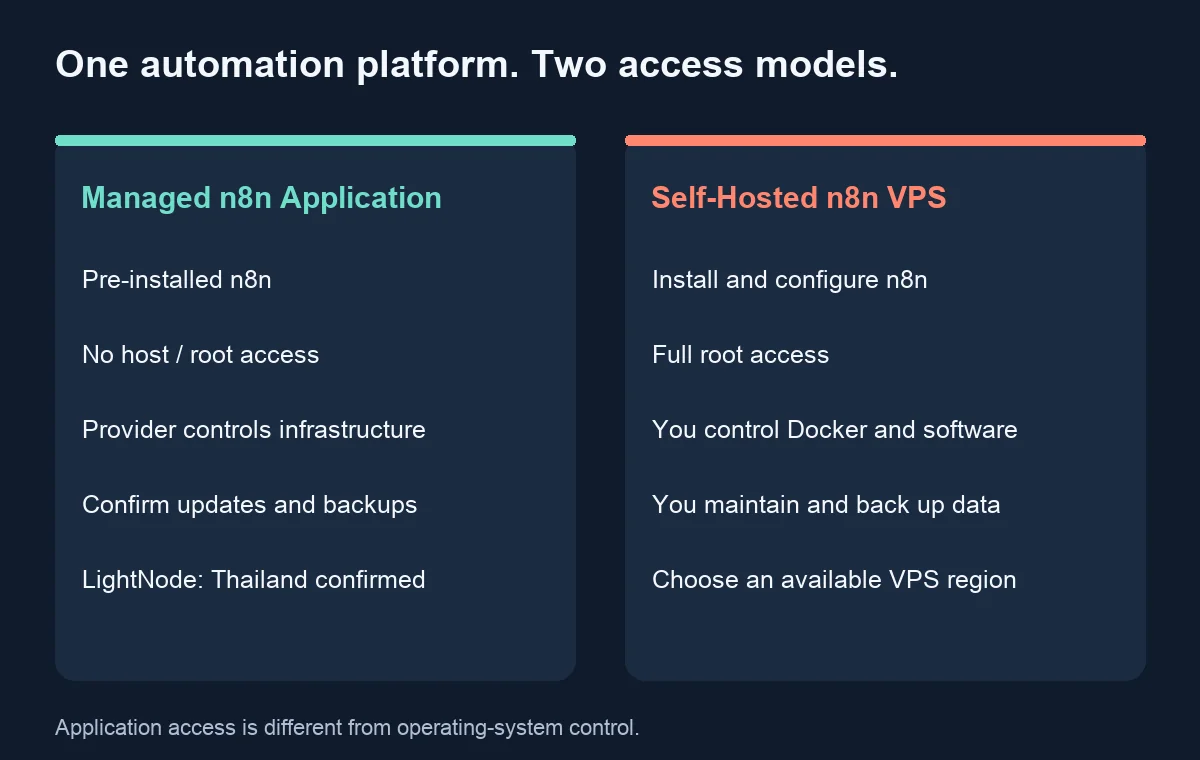
A hosted application gives you access to n8n without installing its dependencies. A self-managed VPS gives you an operating system on which you install and operate n8n. Pre-installed n8n hosting can save setup time, but pre-installed does not establish a complete managed-service agreement.
LightNode n8n Application is a provider-managed application with no host-level access. Confirm who applies n8n updates, backup retention, restore assistance, export options, and incident responsibilities before relying on it. Those details were not established by its public product page.
With a VPS, you control Docker, databases, reverse proxies, and additional software. You also handle patches, monitoring, recovery, and access controls. Budget for that work alongside infrastructure. With either model, you remain responsible for workflow behavior, API credentials, and the data sent to external services.
6 Best Hosting Providers for n8n in 2026
1. LightNode – Best for Ready-to-Use n8n and Flexible Billing
LightNode n8n Application is the relevant option when installation is the obstacle. Its public page says the application is configured in advance and accessible through a supplied URL. Billing is hourly; displayed monthly equivalents are estimates, not a promise of a fixed monthly contract.
Features and fit: NVMe storage and no manual Linux or Docker setup. Thailand is the only currently confirmed application location. Workflow-level access does not grant permission to install arbitrary host software.
| Plan | Application: vCPU / RAM / NVMe | Application monthly equivalent | VPS: vCPU / RAM / NVMe | VPS monthly equivalent | VPS included transfer |
|---|---|---|---|---|---|
| Start | 1 / 1 GB / 1 GB | $1.07 | 1 / 2 GB / 50 GB | $7.71 | 1 TB |
| Agency | 2 / 4 GB / 10 GB | $3.03 | 2 / 4 GB / 50 GB | $14.70 | 2 TB |
| Premium | 4 / 8 GB / 10 GB | $5.83 | 4 / 8 GB / 50 GB | $27.70 | 3 TB |
| Enterprise | 8 / 16 GB / 10 GB | $11.43 | 8 / 16 GB / 50 GB | $52.70 | 4 TB |
Configuration recommendation: Treat Start as a low-load evaluation option. For more workflow data, compare Agency's storage and memory allocation against your retention needs. Application transfer allowances, backup inclusions, exact hourly rates, monthly conversion basis, and stop/delete billing behavior need confirmation at ordering.
Pros: Removes deployment tasks; offers hourly billing. Cons: Application has no root access, only Thailand is confirmed, and storage is limited. Best for: Users who can accept these boundaries and want to focus on workflows.
For custom PostgreSQL, Docker, or additional services, choose LightNode Self-Hosted n8n VPS. The VPS page advertises 40+ locations, including Bangkok, Frankfurt, and US locations; confirm your selected plan's inventory. That footprint does not apply to the Application product. Start with 2 GB for light use or 4 GB for more headroom; maintain it yourself.
2. Hetzner – For Developers Comparing European Cloud Costs
Hetzner supplies Linux cloud servers, networking, firewalls, an API, and Docker images. These are useful building blocks for n8n Docker hosting; they do not establish managed n8n service.
Pricing needs care: The official June adjustment lists CX23 at €5.49/month or $6.49/month in Germany/Finland, excluding VAT and IPv4. However, the current cloud landing page marks some shared-resource offerings unavailable and does not expose a dependable live entry quote. Do not assume an older low-price SKU is orderable.
Recommended configuration: Select an available 4 GB VM for a small database-backed deployment; verify architecture compatibility for custom nodes and images. Pros: Infrastructure automation and European locations. Cons: Availability and regional prices affect the budget, and you maintain the stack. Best for: Developers willing to check current inventory rather than buy on a historical headline. See our Hetzner alternatives for broader comparisons.
3. DigitalOcean – For Beginners Learning General-Purpose VPS Hosting
DigitalOcean's Basic Droplets offer a straightforward configuration ladder. Its pricing page identifies Droplets as infrastructure you administer, with Linux images and optional one-click software stacks. This review assumes manual n8n deployment.
Pricing: Regular Basic plans list $4/month for 512 MiB, $12 for 2 GiB and one vCPU, and $24 for 4 GiB and two vCPUs. The 2 GiB plan includes 50 GiB SSD. Per-second billing took effect in 2026, subject to a 60-second or $0.01 minimum, whichever is higher, and the applicable cap.
Recommended configuration: Use the 2 GiB example for light automation; choose 4 GiB when sharing the VM with PostgreSQL and other services. Pros: Clear plan sizes and documented infrastructure. Cons: Backups cost extra, and the cheapest entry is undersized for this stack. Best for: Users prepared to learn Linux operations. Our DigitalOcean alternatives compares other general-purpose options.
4. Vultr – For Flexible Infrastructure Choices
Vultr's provisioning documentation distinguishes regular Cloud Compute, High Frequency, and High Performance plans. This lets you compare CPU and storage choices rather than treating every VM with equal RAM as interchangeable.
Pricing: The official Cloud Compute overview starts at $0.005/hour for one vCPU, 0.5 GB RAM, and 10 GB storage. This is an infrastructure floor, not our n8n recommendation. A current 2–4 GB regional quote was not independently retrievable, so no remembered monthly price is substituted.
Recommended configuration: Price a 2–4 GB VM and examine storage, transfer, and the selected region. Pros: Several infrastructure families; operating-system and deployment choices. Cons: n8n maintenance remains yours, and Vultr billing continues while a server is stopped; destruction is required to stop server charges. Best for: Users choosing infrastructure around measured workload needs.
5. Akamai Cloud – For General-Purpose Cloud Hosting
Akamai Cloud, formerly known for Linode, offers shared-CPU Linux VMs alongside dedicated and higher-memory families. A small shared instance suits workflows that spend much of their time waiting for APIs; sustained CPU work may justify another family.
Pricing: The official shared table lists Nanode 1 GB at $5/month, Linode 2 GB at $12, and Linode 4 GB at $24. The 2 GB example includes one CPU, 50 GB storage, and 2 TB transfer. Region-specific differences apply.
Recommended configuration: Evaluate 2 GB for light use or 4 GB with local PostgreSQL and more concurrent work. Pros: Explicit resource tiers and upgrade options. Cons: Resizing is needed for more bundled RAM, extra services add cost, and powering off does not end billing. Best for: Teams comfortable owning a conventional Linux deployment.
6. Contabo – For RAM-Focused VPS Comparisons
Contabo is worth examining when memory capacity matters more than the smallest possible instance. However, its public pages returned inconsistent localized catalogs: the current pricing table showed Cloud VPS 4 with 8 GB RAM and 100 GB SSD, while another official product page still listed Cloud VPS 10 with 8 GB and different storage.
Pricing: No single entry price is presented as verified here. Some localized tables omit a clear currency, and promotional effective rates can depend on a 24-month term. Request a quote that names the plan, region, currency, taxes, renewal, and setup fee.
Recommended configuration: An available 8 GB plan can provide capacity for n8n and PostgreSQL, but RAM alone does not predict execution speed. Pros: Larger memory allocations to compare. Cons: Contract and catalog ambiguity; application operations remain your responsibility. Best for: Buyers evaluating the full contract and testing their own workload before committing.
How Much RAM and CPU Does n8n Need?
These are editorial starting points, not universal n8n minimum requirements. n8n server requirements depend on payload size, execution overlap, binary files, custom code, and other services sharing the machine.
| RAM | CPU starting point | Practical use case |
|---|---|---|
| 1 GB | 1 vCPU | Low-load experiments; feasibility depends on deployment and other services |
| 2 GB | 1–2 vCPU | Light self-hosting with small payloads and limited concurrency |
| 4 GB | 2 vCPU | Small or medium workflows with PostgreSQL headroom |
| 8 GB | 2–4 vCPU | More complex processing or overlapping executions |
| 16 GB+ | Workload-dependent | Higher concurrency or larger data; assess worker architecture |
Current n8n Compose documentation specifies 4 GB and two vCPUs for its particular stack with an AI code sandbox. That requirement is distinct from the simpler stack below. Large arrays and files can exhaust memory even when monthly execution counts look modest; consult n8n memory guidance and monitor actual runs. Workflow count alone is a poor sizing metric.
How to Deploy n8n Without Installing Docker
The public LightNode Application page supports this sequence; its authenticated checkout was not tested:
- Open the n8n Application product page and review current terms.
- Choose resources for your expected workload and stored data.
- Confirm the region; currently only Thailand is verified.
- Follow the provider's purchase and provisioning flow.
- Once ready, open the supplied backend URL. The provider says credentials arrive in the provisioning email.
- Sign in and build a small Manual Trigger → Edit Fields workflow to check access before connecting production accounts.
- Secure the account, check HTTPS, and confirm backup/export, recovery, update ownership, and retention arrangements.
No SSH or Docker commands belong in this process. Start with Ready-to-Use n8n Hosting if this access model meets your needs.
How to Self-Host n8n on a VPS with Docker
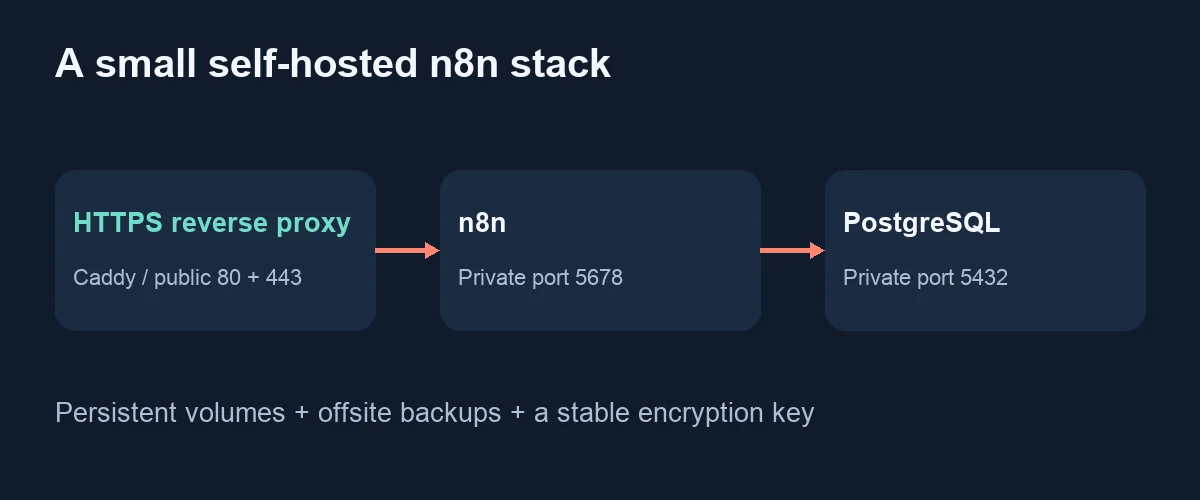
This example is for a fresh Ubuntu 24.04 LTS VPS with sudo access, including LightNode n8n VPS. It does not apply to LightNode n8n Application. It runs a single n8n instance, PostgreSQL, and Caddy; it does not configure queue workers or the optional Assistant sandbox. Review the official hosting examples before extending it.
Prepare Docker, DNS, and secrets
Point automation.example.com to your VPS. Permit TCP 80/443 and restrict SSH to trusted addresses using your provider firewall. Keep 5678 and 5432 private. Start from a fresh host; existing Docker installations need the conflict checks in Docker's Ubuntu guide.
sudo apt update
sudo apt install -y ca-certificates curl
sudo install -m 0755 -d /etc/apt/keyrings
sudo curl -fsSL https://download.docker.com/linux/ubuntu/gpg -o /etc/apt/keyrings/docker.asc
sudo chmod a+r /etc/apt/keyrings/docker.asc
sudo tee /etc/apt/sources.list.d/docker.sources > /dev/null <<EOF
Types: deb
URIs: https://download.docker.com/linux/ubuntu
Suites: $(. /etc/os-release && echo "${UBUNTU_CODENAME:-$VERSION_CODENAME}")
Components: stable
Architectures: $(dpkg --print-architecture)
Signed-By: /etc/apt/keyrings/docker.asc
EOF
sudo apt update
sudo apt install -y docker-ce docker-ce-cli containerd.io docker-buildx-plugin docker-compose-plugin
sudo docker compose version
mkdir -p ~/n8n && cd ~/n8n
umask 077
openssl rand -hex 32  # generate separately for each secret below
Create .env, replacing every placeholder. Set N8N_VERSION to a reviewed, supported exact release, 2.35.0 or newer for the webhook variable used here. Check official releases; do not copy an old example tag blindly.
N8N_VERSION=REPLACE_WITH_REVIEWED_VERSION
DOMAIN=automation.example.com
TIMEZONE=America/New_York
POSTGRES_PASSWORD=REPLACE_WITH_RANDOM_HEX
N8N_ENCRYPTION_KEY=REPLACE_WITH_DIFFERENT_RANDOM_HEX
Keep the encryption key stable and backed up securely: credentials encrypted with it cannot be recovered from a database backup without the key.
Persist n8n and PostgreSQL behind HTTPS
Save this as compose.yaml. PostgreSQL 17 is chosen to keep its data path explicit; major database upgrades need a separate migration. This compact example uses the initial database role; for stricter isolation, adopt the dedicated application role from the official withPostgres template.
services:
  postgres:
    image: postgres:17
    restart: unless-stopped
    environment:
      POSTGRES_DB: n8n
      POSTGRES_USER: n8n
      POSTGRES_PASSWORD: ${POSTGRES_PASSWORD:?Set POSTGRES_PASSWORD}
    volumes:
      - postgres_data:/var/lib/postgresql/data
    healthcheck:
      test: ["CMD-SHELL", "pg_isready -U n8n -d n8n"]
      interval: 5s
      timeout: 5s
      retries: 20
  n8n:
    image: docker.n8n.io/n8nio/n8n:${N8N_VERSION:?Set N8N_VERSION}
    restart: unless-stopped
    depends_on:
      postgres:
        condition: service_healthy
    environment:
      DB_TYPE: postgresdb
      DB_POSTGRESDB_HOST: postgres
      DB_POSTGRESDB_PORT: "5432"
      DB_POSTGRESDB_DATABASE: n8n
      DB_POSTGRESDB_USER: n8n
      DB_POSTGRESDB_PASSWORD: ${POSTGRES_PASSWORD}
      N8N_ENCRYPTION_KEY: ${N8N_ENCRYPTION_KEY:?Set N8N_ENCRYPTION_KEY}
      N8N_HOST: ${DOMAIN}
      N8N_PROTOCOL: https
      N8N_PORT: "5678"
      N8N_EDITOR_BASE_URL: https://${DOMAIN}/
      N8N_WEBHOOK_URL: https://${DOMAIN}/
      N8N_PROXY_HOPS: "1"
      N8N_ENFORCE_SETTINGS_FILE_PERMISSIONS: "true"
      GENERIC_TIMEZONE: ${TIMEZONE}
      TZ: ${TIMEZONE}
      EXECUTIONS_DATA_PRUNE: "true"
      EXECUTIONS_DATA_MAX_AGE: "168"
    volumes:
      - n8n_data:/home/node/.n8n
  caddy:
    image: caddy:2
    restart: unless-stopped
    environment:
      DOMAIN: ${DOMAIN}
    ports:
      - "80:80"
      - "443:443"
    volumes:
      - ./Caddyfile:/etc/caddy/Caddyfile:ro
      - caddy_data:/data
      - caddy_config:/config
volumes:
  postgres_data:
  n8n_data:
  caddy_data:
  caddy_config:
Create Caddyfile:
{$DOMAIN} {
    reverse_proxy n8n:5678
}
Caddy obtains HTTPS certificates when DNS and inbound access work. Its reverse proxy handles forwarded headers. This example assumes one trusted proxy; adding a CDN requires revisiting trusted proxy handling and hop counts. n8n's webhook configuration reference documents N8N_WEBHOOK_URL; the older WEBHOOK_URL is deprecated from 2.35.0.
chmod 600 .env
sudo docker compose config --quiet
sudo docker compose up -d
sudo docker compose ps
sudo docker compose logs --tail=50 n8n caddy
Open your HTTPS domain immediately and create the owner account before admitting general traffic. Use a strong password and available account security controls. Test a small workflow, verify the displayed production webhook URL, publish/activate the workflow as required by your version, then send a test request. Test Code nodes separately; external task-runner configuration and dependencies require additional setup.
Back up data and update deliberately
For a consistent maintenance backup, stop workflow writes, dump PostgreSQL, and archive the n8n volume. Run from the Compose directory:
mkdir -p backups
chmod 700 backups
sudo docker compose stop n8n
sudo docker compose exec -T postgres pg_dump -U n8n -d n8n -Fc > backups/n8n.dump
sudo docker compose run --rm --no-deps --user root --entrypoint tar n8n \
  -C /home/node/.n8n -czf - . > backups/n8n-data.tgz
sudo docker compose start n8n
chmod 600 backups/*
Check each command succeeds before proceeding. If a backup fails, restore service with sudo docker compose start n8n, then investigate. Back up .env, Compose, and Caddy configuration separately; encrypt and copy the backup set off the VPS. Restore-test the database, volume, and original encryption key on an isolated instance with triggers disabled. Workflow JSON exports alone are not a complete disaster-recovery backup.
Before updating, read release notes, take a backup, change the pinned n8n version, then run sudo docker compose pull n8n and sudo docker compose up -d n8n. Check credentials and webhooks afterward. Database migrations can prevent an image-only rollback; restore the matching backup when necessary. Never use docker compose down -v for routine updates.
n8n Hosting Cost: Managed Application vs VPS
Total cost combines hosting, backup storage, maintenance time, and connected-service charges. A smaller infrastructure bill does not guarantee a cheaper reliable automation service. See our budget VPS comparison for general purchasing considerations.
| Cost item | Pre-installed application | Self-managed VPS |
|---|---|---|
| Base service | Application resource plan | VM, disk, and any IP charges |
| Setup and updates | Installation removed; confirm update responsibility | Your installation, patching, and testing time |
| Recovery | Confirm backup scope and paid restores | Offsite backups and restore testing |
| Growth | Confirm storage limits, upgrades, and migration | Larger VM or separate database/workers |
| Usage extras | Confirm transfer/storage terms | Transfer overages, snapshots, volumes |
| Integrations | External API charges still apply | External API charges still apply |
LightNode's monthly equivalents are not necessarily fixed monthly contracts. Confirm hourly rates and when billing ends. Do not assume stopping a VM stops charges: Vultr and Akamai explicitly reserve resources while stopped. For Contabo, compare prepaid term totals and renewal conditions. Price differences are meaningful only after matching access, region, storage, and operational obligations.
LightNode n8n Application vs LightNode n8n VPS
| Feature | n8n Application | n8n VPS |
|---|---|---|
| Deployment | Pre-installed and configured | You administer the deployment |
| Root access | No | Yes |
| Docker control | No host-level control | You manage containers |
| Custom software | No arbitrary host installations | Install compatible services yourself |
| Storage | Listed plans: 1 or 10 GB NVMe | Listed plans: 50 GB NVMe |
| Regions | Thailand confirmed; more planned | Provider advertises 40+; verify inventory |
| Pricing | Hourly; $1.07–$11.43 displayed monthly equivalents | Hourly; $7.71–$52.70 displayed monthly equivalents |
| Best for | Opening n8n without server setup | Full control of a Linux environment |
An application's allocated memory and a VPS's memory do not represent the same permissions or maintenance scope. Decide on the product model first, then compare capacity.
Which n8n Hosting Option Should You Choose?
- No server experience: Consider LightNode n8n Application if Thailand and its support boundaries work for you.
- Full root access: Choose a self-managed VPS; LightNode n8n VPS is one option among the six compared.
- Lowest verified displayed cost: Application's $1.07 equivalent is the smallest confirmed numeric entry here, but it is not a full VPS or a sufficient plan for every workload. Unresolved quotes prevent a universal cheapest-provider claim.
- Small automation projects: Start with small payloads and limited concurrency; prioritize recoverability over buying excess CPU.
- Multiple workflows: Size for simultaneous execution and data volume, then monitor memory and disk growth. Our practical n8n use cases can help define the workload.
- Custom Docker deployment: Use a root-access VPS and a maintained, versioned configuration.
- Regional requirements: Verify the actual provisioning location and data-processing terms before buying. Application's planned expansion is not current availability.
Frequently Asked Questions
What is the best VPS for n8n?
Choose a root-access VPS with enough memory, storage, and a suitable region if you can maintain it. For installation-free access, LightNode n8n Application is a different product category worth considering.
Can I host n8n without Docker?
Yes. A pre-installed service removes Docker work for the user. n8n also documents npm installation for users who manage their own runtime.
How much RAM does n8n need?
There is no single figure for every deployment. Two to four GB is an editorial starting range for light self-hosting; data-heavy processing and optional sandbox services need more planning.
Is LightNode n8n Application a VPS?
It is a pre-deployed hosted application, not a general-purpose Linux VPS with host-level access.
Does LightNode n8n Application provide root access?
No. Its official FAQ explicitly excludes host-level and root access.
How much does n8n hosting cost?
Verified displayed entry figures include LightNode Application's $1.07 monthly equivalent and VPS's $7.71 equivalent. General VPS costs vary with usable resources, region, billing terms, and backups.
Is n8n free for self-hosting?
The Community edition is available under n8n's Sustainable Use License for permitted uses. Paid features and restricted commercial redistribution or hosting uses need separate review; consult the actual license.
Can I migrate n8n to another server?
Yes, with compatible versions, the database, persistent data, and the original encryption key. Update DNS and webhook URLs, test credentials, and prevent duplicate triggers. Hosted application export access must be confirmed with its provider.