
Best VPS for Dokploy in 2026: Requirements, Pricing & Setup Guide
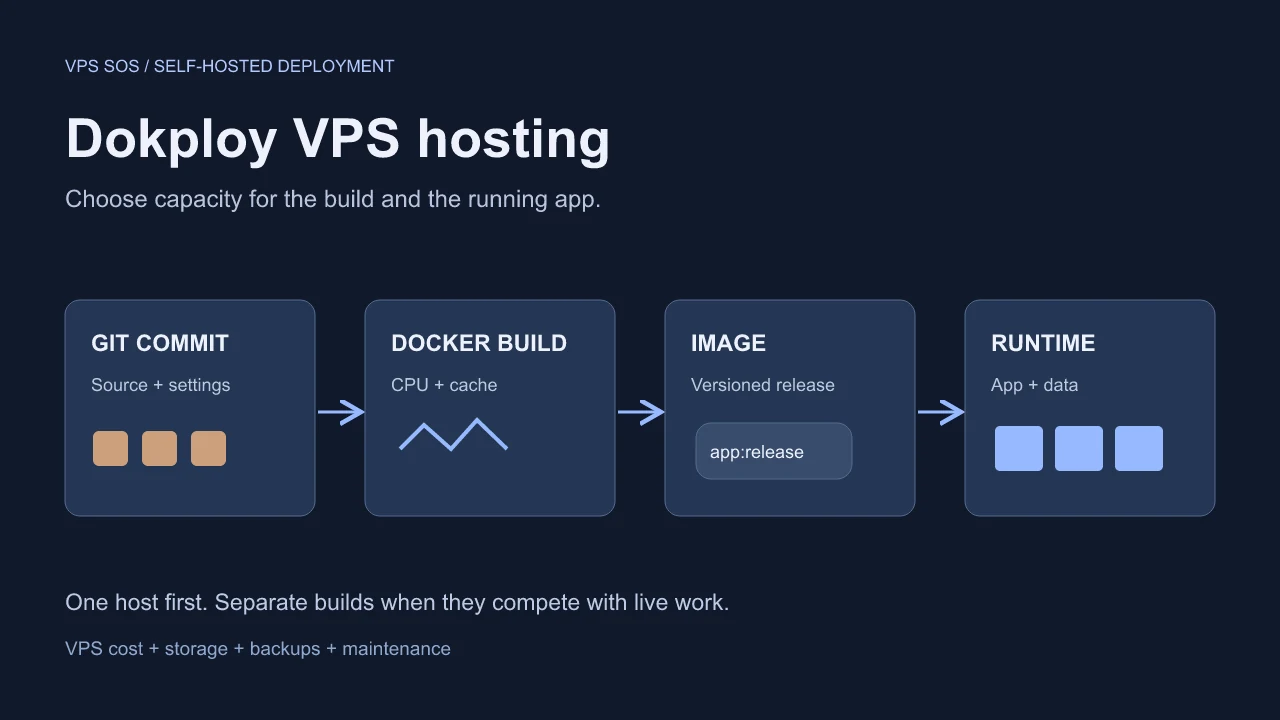
The best VPS for Dokploy is a Linux machine sized for both deployments and the applications that stay running afterward. Dokploy is a self-hosted deployment platform: it connects Git repositories or container images to Docker, databases, and Traefik routing, while giving you a dashboard instead of a collection of manual commands.
Its installation guide recommends at least 2 GB RAM and 30 GB disk. Those figures do not describe a comfortable production stack. Docker image layers, build caches, logs, and database growth need additional space; a build can exhaust memory while a small website is otherwise idle.
For a first project, evaluate two vCPU, 4 GB RAM, and 40–60 GB SSD. Below, six providers are compared against usable configurations, followed by an Ubuntu setup, a working Node.js example, and a cost breakdown. The key decision is whether one VPS should build and serve everything, or whether those jobs need separate machines.
Verified October 22, 2026. This analysis uses official documentation and public pricing, not purchased-server benchmarks. Regional inventory, tax, and checkout terms can change.
Best VPS for Dokploy: Quick Comparison
These are small-project candidates. Production recommendations depend on your builds, data, and recovery needs.
| Provider | Recommended VPS Plan | vCPU | RAM | Storage | Verified Price | Billing | Best For |
|---|---|---|---|---|---|---|---|
| LightNode | Agency Linux VPS | 2 | 4 GB | 50 GB NVMe | $14.70 displayed monthly equivalent | Hourly; selected-plan hourly quote required | Temporary projects and regional trials |
| Hetzner | CPX22, subject to stock | 2 | 4 GB | 80 GB NVMe | Check current pricing; displayed EU reference €19.99 including IPv4, excluding VAT | Hourly with monthly cap | Comparing EU infrastructure |
| DigitalOcean | Regular Basic 4 GiB | 2 | 4 GiB | 80 GiB SSD | $24/month | Per-second, minimum charge and monthly cap | Learning cloud administration |
| Vultr | vc2-2c-4gb | 2 | 4 GB | 80 GB SSD | Base $20/month; São Paulo $30 | Base $0.027/hour, monthly cap | Region-specific deployments |
| Akamai / Linode | Linode 4GB | 2 | 4 GB | 80 GB SSD | Base $24/month; Jakarta $28.80, São Paulo $33.60 | Base $0.036/hour, monthly cap | Conventional Linux hosting |
| Contabo | Cloud VPS Plus 4 | 4 shared | 8 GB | 150 GB NVMe | Check current pricing | Term-dependent | Comparing memory and disk capacity |
Official sources: LightNode, Hetzner, DigitalOcean, Vultr API, Linode API, and Contabo.
Entry prices buy different resources. LightNode's $7.71 monthly equivalent has 1 vCPU/2 GB; DigitalOcean's $4 entry has 512 MiB; Vultr's API lists 1 vCPU/1 GB at $5; the $5 Nanode has 1 GB. The latter three fall below Dokploy's memory recommendation. Hetzner's lowest displayed offers have availability restrictions; Contabo needs a localized quote. Our cheap VPS guide covers broader budget trade-offs.
What Is Dokploy and Why Self-Host It?
Dokploy keeps deployment settings, environment variables, domains, and operations together. It supports Git sources, Docker images, databases, and Traefik with automated certificates. Compared with running Docker commands yourself, the value is repeatable configuration and deployment visibility; Linux maintenance remains yours.
Its deployment model has three distinct choices:
- Dokploy server: dashboard, builds, and workloads share one host.
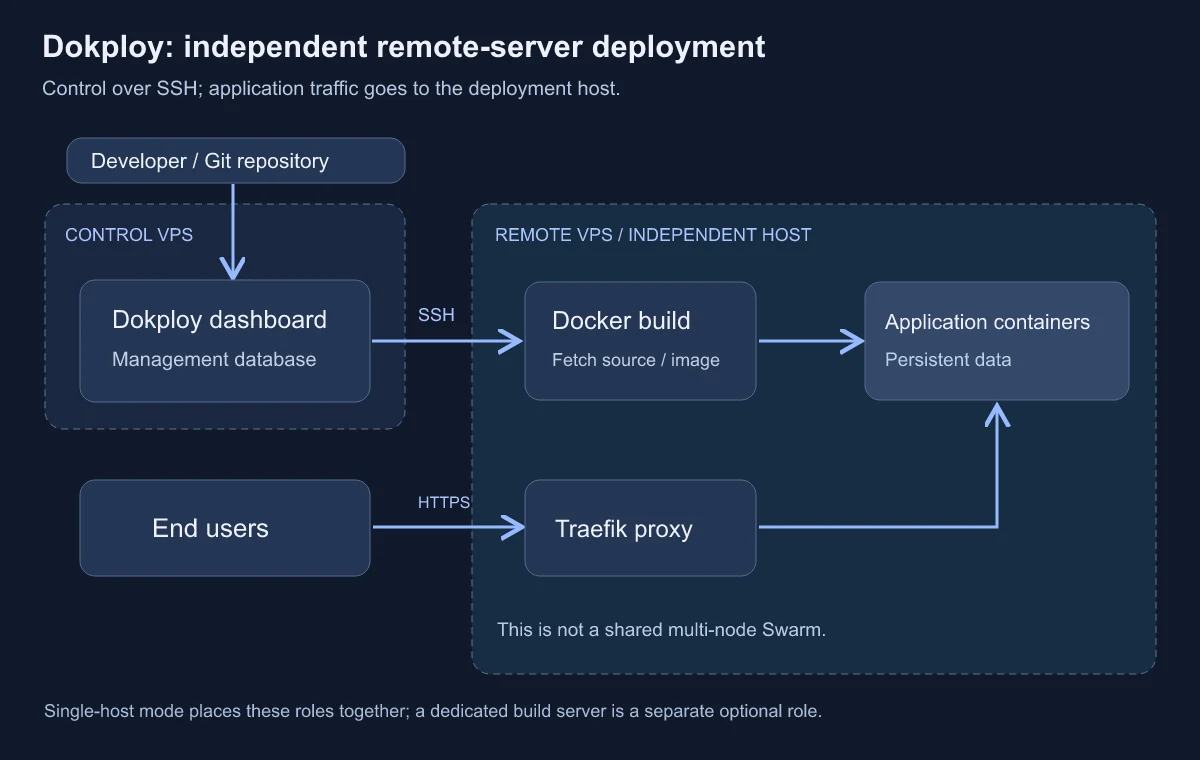
- Remote servers: independent machines managed through SSH, with their own Docker and Traefik. They are not automatically a shared cluster.
- Swarm nodes: machines joined to one Swarm for replicas across nodes; registry access and additional operations are required.
Compose and Stack are also different deployment modes. Stack uses Swarm and does not support Compose's build directive; supply prebuilt images. Replicas alone do not replicate a local database volume.
Dokploy VPS Requirements
Official Minimum Requirements
The installation page recommends at least 2 GB RAM and 30 GB disk, without specifying a separate numeric CPU minimum. Do not import Coolify's CPU requirement into Dokploy's documentation.
Tested distributions include Ubuntu 24.04/22.04 LTS, Debian 12/11, and Fedora/CentOS versions listed there. A historical tested image is not necessarily still maintained. This tutorial chooses fresh Ubuntu 24.04 LTS with root provisioning access. Check image architecture compatibility before selecting ARM.
Recommended VPS for Small Projects
| Capacity tier | CPU | RAM | Disk planning |
|---|---|---|---|
| Official documented baseline | No separate numeric CPU minimum stated | At least 2 GB | At least 30 GB |
| Small developer projects | 2 vCPU | 4 GB | 40–60 GB SSD |
| Small production applications | 4 vCPU | 8 GB | Around 80 GB SSD+ |
| Several applications and databases | 4–8 vCPU | 16 GB | Around 100 GB SSD+ |
All tiers above the baseline are editorial planning suggestions, not official application-capacity guarantees.
Production Hosting Requirements
Add application memory peaks, database working sets, concurrent requests, and deployment overlap. Monitor the busiest period, not just the idle dashboard. Production readiness also requires protected access, persistent data, backups, and a tested recovery path.
Storage and Docker Build Requirements
Budget separately for checked-out source, image layers, build cache, running volumes, logs, and backup staging. A 50 GB disk can become the constraint before an 8 GB memory allocation does. Inspect usage with df -h, df -i, and docker system df; do not solve capacity problems by blindly deleting volumes.
When to Use a Separate Build Server
Move builds when they disrupt request latency or repeatedly exhaust memory. Dokploy's build-server feature builds an image remotely and pushes it to a registry for the deployment host to pull. It currently supports Applications, not Docker Compose deployments. Include the builder, registry storage, and image transfer in your budget.
6 Best VPS Hosting Providers for Dokploy in 2026
The following are self-managed Linux infrastructure options, not certified Dokploy performance results.
1. LightNode – For Flexible Hourly Billing
LightNode hourly Linux VPS gives a developer root/SSH access for an ordinary Dokploy installation. No dedicated Dokploy image was verified.
Agency combines 2 vCPU/4 GB/50 GB NVMe/2 TB transfer at $14.70 monthly equivalent. Premium lists 4 vCPU/8 GB/50 GB/3 TB at $27.70 equivalent. Hourly billing is useful for Docker tests and short projects, but confirm the actual chosen-plan rate, stop/release rules, backup charges, and port speed. The advertised entry $0.012/hour is not an Agency quote.
Locations advertised include Frankfurt, Singapore, Bangkok, and US sites within a 40+ location network. Its dedicated-IP page lists static dedicated addresses; verify inclusion and retention for the order. The main limitation is storage: Premium's listed 50 GB remains below our 80 GB production planning example.
2. Hetzner – For European Infrastructure Buyers
CPX22 has 2 vCPU, 4 GB RAM, and 80 GB NVMe. The EU page displays €19.99/month including IPv4 and excluding VAT, but flags products unavailable. Check current pricing and inventory before relying on that reference.
Ubuntu images and SSH access support Docker deployment. EU transfer is at least 20 TB; US and Singapore allowances differ. Locations include Germany, Finland, US sites, and Singapore, with model availability varying. IPv4 costs €0.50/month separately; backups add 20% of the server price. Billing continues until deletion.
It is relevant for available EU capacity, but stock and add-ons can outweigh a low headline price. See our Hetzner alternatives comparison.
3. DigitalOcean – For Beginner-Friendly Cloud Operations
Regular Basic 2 vCPU/4 GiB/80 GiB SSD costs $24/month, including 4,000 GiB transfer and bundled public IPv4. The 4-vCPU/8-GiB/160-GiB tier is $48.
Linux Droplets offer root access and regional options including New York, Frankfurt, and Singapore. Per-second billing has a minimum of 60 seconds or $0.01, whichever is greater. Weekly percentage-based backups add 20%; daily add 30%, with usage-based alternatives.
The documented resource ladder helps someone learning VPS operations. Shared CPU, backups, extra storage, and application maintenance still require attention; the $4 machine is not a suitable substitute for the matched configuration.
4. Vultr – For Global Infrastructure Options
The API lists 2 vCPU/4 GB/80 GB SSD/3,072 GB transfer for vc2-2c-4gb, at $20/month or $0.027/hour base. São Paulo is $30/$0.041. The 4-vCPU/8-GB/160-GB base plan is $40.
Locations include London, Frankfurt, Singapore, Tokyo, and multiple US sites. Ubuntu deployment is documented; verify inventory, default IPv4, any additional IP cost, and backup surcharge for the chosen instance.
Regional selection is useful for users and database proximity. Regional overrides and different compute families complicate comparisons. Stopped instances remain billable, so deleting test capacity requires a separate data-preservation decision.
5. Akamai Cloud – For General-Purpose Hosting
The Linode API returns 2 vCPU/4 GB/80 GB SSD/4,000 GB transfer, base $24/month/$0.036 hourly, and base backup add-on $5/month. Regional overrides include Jakarta $28.80 plus $6 backup and São Paulo $33.60 plus $7 backup.
Shared instances use core regions; creation supports Ubuntu and an included automatically assigned public IPv4. Root access permits normal Docker installation. The API's 4,000 Mbit/s outbound limit is not measured application throughput.
Clear upgrade tiers suit conventional Linux workloads. Shared CPU and larger memory alone do not guarantee fast builds; add-on storage and region selection affect the bill.
6. Contabo – For Memory-Focused Plan Comparisons
Cloud VPS Plus 4 lists 4 shared vCPU/8 GB/150 GB NVMe, a 500 Mbit/s port, and advertised unlimited transfer subject to fair use. Check current pricing: localized promotion, currency, term, renewal, and setup/region charges need an explicit quote.
The VPS documentation lists static IPv4, optional Auto Backup for eligible families, and regions across Europe, the UK, the US, and Asia-Pacific. Ubuntu images and SSH/root administration support Docker.
The larger disk/memory allocation is worth evaluating for multiple containers. Shared cores and contract totals are the trade-offs; neither RAM size nor a port-rate label proves database performance.
How to Install Dokploy on an Ubuntu VPS
Prepare a fresh server
Provision Ubuntu 24.04 LTS with SSH keys and recovery-console access. Our Ubuntu VPS guide covers host selection. On that new VPS:
ssh root@YOUR_VPS_IP
cat /etc/os-release
nproc
free -h
df -h / /var
ss -lntup
apt-get update
apt-get upgrade
apt-get install -y curl ca-certificates
Review upgrades and reboot if required. Confirm TCP 80, 443, and 3000 are free. The first two serve Traefik HTTP/HTTPS; 3000 is Dokploy's dashboard.
In the provider firewall, allow SSH from trusted administrators and any required Dokploy control-server sources, plus public TCP 80/443. Keep 3000 blocked publicly or temporarily allow only your admin address, including matching IPv6 rules. Docker-published ports can bypass ordinary UFW expectations; follow the hardening guide.
Use an empty host. The checked installer calls docker swarm leave --force before initializing its Swarm. Do not run it on an existing cluster or a server containing workloads you need to preserve. Multi-node Swarm ports should be allowed only between intended nodes on a protected network; they are unnecessary for this single-host tutorial.
Review and run the installer
The official current command is curl -sSL https://dokploy.com/install.sh | sh. Review remote code before executing it with root privileges. The release API returned v0.30.8 during research; its versioned asset was also verified. A reproducible installation uses:
curl -fL https://github.com/Dokploy/dokploy/releases/download/v0.30.8/install.sh \
  -o /root/dokploy-v0.30.8-install.sh
less /root/dokploy-v0.30.8-install.sh
sh /root/dokploy-v0.30.8-install.sh
docker version
docker info --format '{{.Swarm.LocalNodeState}}'
docker service ls
docker service logs --tail 50 dokploy
Review newer releases before installing. The checked asset installs Docker when absent and targets Docker 28.5.0 for that path; that is an installer selection, not a universal minimum-version claim. Applications and the control plane use Docker/Swarm services; Compose resources have their own mode.
Claim the dashboard and enable HTTPS
From your computer, tunnel initial dashboard access:
ssh -N -L 3000:127.0.0.1:3000 root@YOUR_VPS_IPOpen http://127.0.0.1:3000, create the first administrator immediately, and protect the account. The tunnel encrypts bootstrap traffic without permanently exposing port 3000.
Point dokploy.example.com to the VPS; remove an unusable AAAA record. In Settings → Server web-server settings, set the host to that domain, enable HTTPS, and select Let's Encrypt. Verify login and the certificate at https://dokploy.example.com before closing any temporary public 3000 rule. Keep SSH working for operations; do not expose the Docker socket/API or database ports to make routing work.
How to Deploy Your First Application with Dokploy
Use this dependency-free Node.js app to check Git builds, environment variables, and routing. Put these files in a Git repository you control.
package.json:
{"name":"dokploy-demo","private":true,"type":"module","scripts":{"start":"node server.js"}}server.js:
import { createServer } from 'node:http';
const port = Number(process.env.PORT || 3000);
createServer((req, res) => {
  res.setHeader('Content-Type', 'application/json');
  res.end(JSON.stringify({
    message: process.env.APP_MESSAGE || 'Hello from Dokploy',
    path: req.url
  }));
}).listen(port, process.env.HOST || '0.0.0.0');Dockerfile:
FROM node:24-alpine
WORKDIR /app
COPY --chown=node:node package.json server.js ./
ENV NODE_ENV=production
USER node
EXPOSE 3000
CMD ["node", "server.js"]
The tag exists, but is mutable; pin a reviewed digest for longer-lived deployments.
- Select Create Project, then open its environment and add an Application. Keep Dokploy Server as the initial deployment target.
- In General, configure the Git repository, branch, and root build path. Select Dockerfile as the build type, with
Dockerfileas its path and.as the context. Authorize access separately for a private repository. - In Environment, set
PORT=3000andAPP_MESSAGE=Hello from my VPS; save. Use supported build secrets rather than Docker build arguments for credentials. - Select Deploy and follow Deployments, then Logs. A successful image build does not alone establish a healthy app.
- In Domains, add
demo.example.com, container port 3000, HTTPS enabled, certificate letsencrypt; point DNS to this VPS. No additional public host port is needed. The app's internal 3000 is separate from the dashboard's host 3000. - Open the HTTPS URL and verify the JSON message and path. Dokploy's free
traefik.metest domains are HTTP by default; do not assume HTTPS is automatic for those domains.
See the official Application, Dockerfile, variable, and domain references.
Back up before relying on it
Configure an S3 destination. Web Server → Backups saves the management PostgreSQL database and /etc/dokploy. Back up application databases and persistent data separately. Dokploy's volume backups support named volumes, not bind mounts; keep database-aware dumps where consistency requires them.
Test restore on an isolated replacement: instance restore replaces management files and database data. Preserve secrets securely and keep copies off the VPS. Review releases and use the reviewed version's installer with sh script.sh update, or the official latest-script sh -s update path. Back up first; application images and database migrations have separate update/rollback requirements.
Dokploy Hosting Costs Explained
These are illustrative monthly budgets, not invoices. Assume USD base regions, included ordinary transfer/IPv4, self-hosted management on the workload VPS, and no separate paid database or monitoring service. Backup reserves below are editorial allowances, not quoted products. Tax, labor, domains, APIs, overages, and extra storage are additional.
| Scenario | Compute assumption | Offsite backup/storage allowance | Self-hosted monthly estimate | Cloud alternative, same compute reservation |
|---|---|---|---|---|
| Personal developer project | LightNode Agency $14.70 equivalent | $5 | $19.70 equivalent | $24.20 with one $4.50 Hobby server |
| Small SaaS | Vultr base 4 vCPU/8 GB/160 GB $40 | $10 | $50 | $54.50 with one Hobby server; team needs may justify Startup |
| Multiple apps/databases | DO 8 vCPU/16 GiB/320 GiB $96; optional $24 builder | $20 | $116, or $140 with builder | $120.50 on one Hobby server; check plan eligibility/billing for a separate builder |
A domain's annual renewal should be amortized separately. Registry retention, database backups, IPv4 add-ons, expanded disks, network overages, and operations time can exceed the dashboard subscription. Our n8n VPS guide covers an automation workload with its own persistence and credential-recovery needs.
Dokploy Cloud vs Self-Hosted Dokploy
Self-hosted community Dokploy is free to run on your infrastructure. Paid Enterprise features are separate. Cloud operates the management plane; you still provide the servers running apps, databases, and Traefik.
The live pricing switch showed monthly Hobby $4.50/server and Startup $15/month including up to three servers, with $4.50 per additional server. Yearly showed Hobby $43.20/server/year ($3.60 monthly equivalent) and Startup $144/year ($12 equivalent). Do not compare annual equivalents with cancellable monthly charges. Confirm additional-server annual terms at checkout.
Hobby's user/environment/backup limits differ from Startup. Cloud control-plane maintenance does not replace workload backups, OS patching, or VPS fees. Unlimited deployments means no deployment-count cap, not unlimited compute capacity.
Dokploy vs Coolify: Key Differences
| Decision | Dokploy | Coolify |
|---|---|---|
| Installation | Linux installer, Docker/Swarm foundation | Linux installer, Docker/Compose foundation |
| Deployment workflow | Applications, independent remote servers, or explicit Swarm nodes | Applications/services on localhost or SSH-connected servers |
| Docker Compose | Compose or Stack; Stack cannot build images | Compose from Git or an entered definition |
| Remote servers | SSH deployment servers; separate Application builders | SSH deployment servers and build-server roles |
| Databases | Managed resource controls; backup scope must be configured | Database resources; separate workload recovery needed |
| Resource baseline | At least 2 GB/30 GB; no numeric CPU minimum stated | 2 cores/2 GB/10 GB free; installation disk guidance is higher |
| Best fit to evaluate | Developers wanting explicit Compose/Stack and Swarm choices | Developers evaluating its application/service workflows |
These are documented workflows, not speed rankings. Read our Coolify requirements and cost guide for its configuration details and the official Coolify setup for current requirements.
Common Dokploy Deployment Problems
| Problem | Check before changing anything |
|---|---|
| Dashboard unavailable | docker service ls; docker service logs --tail 100 dokploy; compare tunneled access with the domain |
| Host port 3000 conflict | ss -lntp; identify its owner; use a fresh host or reviewed custom installation |
| Docker installation failed | systemctl status docker --no-pager; check OS, package/network errors and installer output |
| Deployment stuck | Inspect Deployments, build-host capacity, registry authentication, and service task errors with docker service ps SERVICE_NAME --no-trunc |
| Reverse proxy error | Check Traefik logs, correct host/container port, service health and network attachment |
| SSL fails | Verify A/AAAA records, TCP 80/443, HTTPS and certificate selection; inspect an upstream proxy separately |
| Out of memory | free -h; docker stats --no-stream; kernel OOM logs; reduce build overlap or add capacity |
| Disk full | df -h; df -i; docker system df; identify cache/log/volume growth without deleting needed data |
| Database unreachable | Check readiness, internal hostname/network, port and environment values; public exposure is usually unnecessary |
| Remote SSH fails | Check IP, user, port, authorized public key and selected private key; allow the control server's source and validate setup |
For a remote deployment server, create/select an SSH key, authorize its public half, enter connection details, test access, and use Setup Server. Keep Bash available as documented. This creates an independent deployment target, not an automatic multi-node Swarm.
Which VPS Should You Choose for Dokploy?
LightNode Agency has the lowest verified displayed USD cost among these matched small-project examples, and hourly billing suits short tests. That is not a universal cheapest-provider claim. DigitalOcean is useful for learning cloud operations; Linode provides another clear plan ladder.
For a small SaaS, compare an 8 GB Vultr or equivalent VM against build peaks and recovery requirements. Check Hetzner when suitable EU stock is available. For multiple applications or storage-heavy work, compare larger disks and Contabo's term-specific total, or separate databases/builds across machines. Start with a usable 4 GB plan, measure it, and test recovery before treating it as production-ready.
Frequently Asked Questions
What is the best VPS for Dokploy?
A compatible Linux VPS with adequate build/runtime headroom, suitable location, and clear total pricing. The six examples address different needs.
How much RAM does Dokploy need?
The official installation guide recommends at least 2 GB. Four GB is our small-project planning suggestion, not a capacity guarantee.
Can Dokploy run on a 1GB VPS?
That is below the documented recommendation. Do not budget production applications around whether the dashboard happens to start.
Is Dokploy free to self-host?
The community edition is free; infrastructure, operations and separately licensed Enterprise features are not included.
Does Dokploy require Docker?
Yes. The installer can install Docker; Dokploy uses Docker/Swarm, with separate Compose/Stack deployment choices.
Can I install Dokploy on Ubuntu?
Yes. Ubuntu 24.04 LTS is listed in the installation guide and is the fresh-server choice used here.
How much does Dokploy hosting cost?
Our personal-project estimate is $19.70 monthly equivalent including an assumed $5 backup allowance. Cloud and other services cost extra.
Is Dokploy better than Coolify?
Choose by deployment workflow, Compose/Swarm requirements, team controls, and maintenance needs; no comparative benchmark is claimed here.
Can Dokploy run multiple applications?
Yes, within available resources. Independent remote hosts and shared Swarm nodes have different operational and storage implications.
Can I connect remote VPS servers to Dokploy?
Yes. Provide authorized SSH access and complete the documented remote-server setup; restrict management access to intended sources.