
Best VPS for Paperless-ngx in 2026: RAM, Storage & Setup
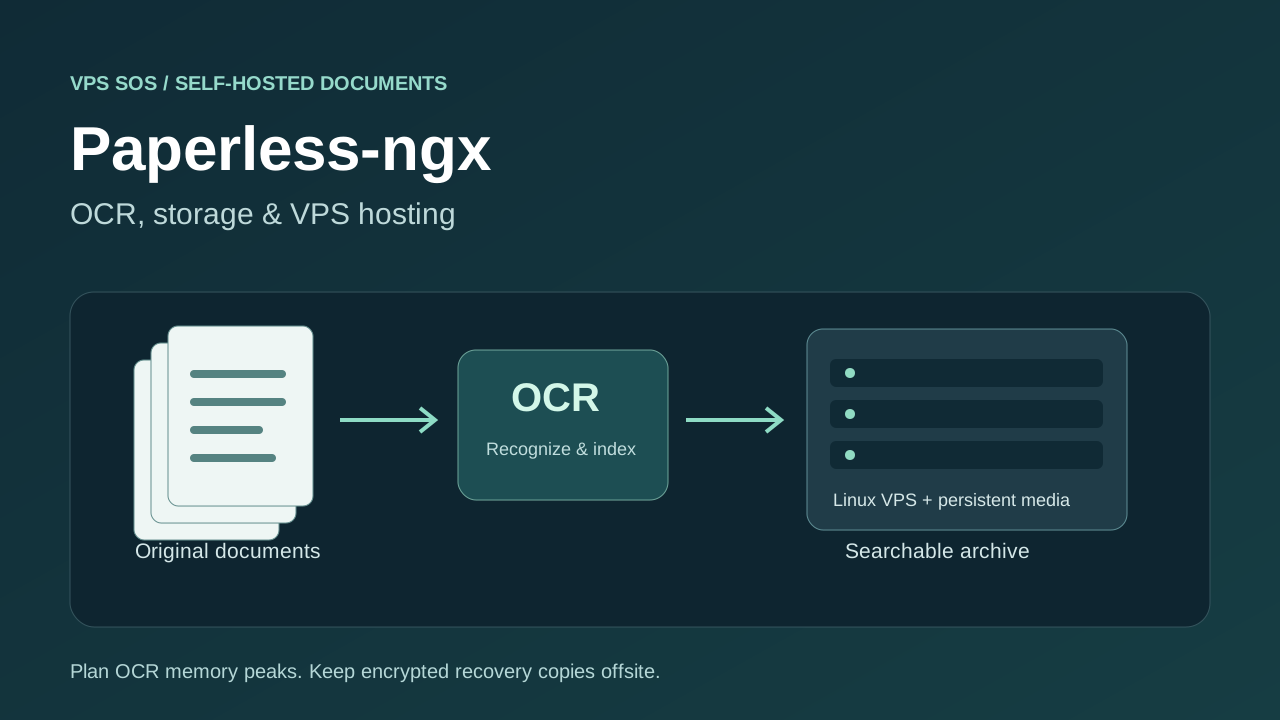
The best VPS for Paperless ngx has enough memory for OCR peaks and enough disk for both your original scans and their processed copies. Paperless-ngx turns documents into a searchable archive with OCR, tags and a browser interface. A VPS keeps that archive available when your home computer is off, while giving you control over its location and access.
Start by measuring a representative batch of files. A short text PDF and a high-resolution, hundred-page scan create very different CPU, memory and storage demands. OCR concurrency matters as much as the document count. Backups also need their own capacity outside the server.
This guide compares six VPS providers, explains RAM and storage planning, and follows the official PostgreSQL Docker Compose installation. It includes OCR settings, automatic imports and an encrypted recovery workflow, so you can choose a configuration you can afford to maintain.
Prices and technical references checked October 29, 2026. The latest stable release verified is Paperless-ngx 3.3.4. These are public catalog references, not purchases or OCR benchmarks. Confirm region, inventory, tax and the final order total.
Best VPS for Paperless-ngx: Quick Comparison
The recommended plans target routine OCR with roughly 4GB RAM or more. Cheaper entry tiers are separate; CPU count alone does not establish OCR speed.
| Provider | Recommended Plan | vCPU | RAM | Included Storage | Storage Expansion | Verified Monthly Cost | Best For |
|---|---|---|---|---|---|---|---|
| LightNode | Agency Linux | 2 | 4GB | 50GB NVMe | Additional cloud disk; console quote | $14.70 displayed reference | Flexible hourly hosting |
| Hetzner | CPX22, check availability | 2 | 4GB | 80GB NVMe | Attached Volumes | Check current pricing | EU placement after quote check |
| DigitalOcean | Basic Regular 4GiB | 2 | 4GiB | 80GiB SSD | Attached Volumes | $24 | Documented first deployment |
| Vultr | vc2-2c-4gb | 2 | 4GB | 80GB SSD | Regional Block Storage | $20 base region | Regional VPS options |
| Akamai Cloud / Linode | Linode 4GB | 2 | 4GB | 80GB SSD | Block Storage; check regional quote | $24 base region | General-purpose hosting |
| Contabo | Cloud VPS 4 | 4 | 8GB | 100GB SSD | Larger plans; verify add-on compatibility | Check current pricing | Larger resource configurations |
What Is Paperless-ngx?
Paperless-ngx is an open-source, self-hosted document management system. It imports files, extracts text, applies OCR where needed and provides full-text search. Tags, correspondents, document types and matching rules organize receipts, invoices and correspondence. Its web interface also supports permissions and automatic classification.
Documents remain in storage you administer. That makes disk management, access controls and recovery part of running the service. It complements a photo library such as Immich, but document originals, metadata and searchable derivatives need their own retention plan.
Paperless-ngx Server Requirements
CPU and RAM Requirements
The official setup guide supports modest hardware and recommends Docker for most users. It does not establish one VPS specification that guarantees every OCR workload. Budget separately for Linux/Docker, the application, PostgreSQL, the broker and temporary OCR work. Optional conversion services add further memory use.
Recommended VPS Configurations
These are editorial starting estimates, including the host and core containers, not official minimums or performance guarantees. Storage figures describe a small initial deployment; the library calculation below can override them.
| Workload | vCPU | RAM | Initial SSD Budget | OCR Starting Point |
|---|---|---|---|---|
| Personal, small library | 2 | 2GB | 30GB | One worker, one OCR thread; test carefully |
| Regular OCR | 2 | 4GB | 50GB | Start at 1 × 1, monitor peaks |
| Frequent scanning, small office | 4 | 8GB | 100GB | Evaluate 1 × 2 or 2 × 1 |
| Large batches or libraries | 4-8 | 8-16GB | Expandable storage | Tune from measured queue and memory use |
OCR Performance and Resource Usage
High-resolution images, long PDFs, several recognition languages and simultaneous jobs can cause short CPU/RAM peaks. User traffic, database queries, index updates and classification compete with OCR. Tika/Gotenberg can increase the footprint when converting Office documents.
The current configuration reference defines PAPERLESS_TASK_WORKERS for parallel background tasks and PAPERLESS_THREADS_PER_WORKER for pages processed in parallel within a document. Keep their product at or below the logical CPU count. On a 2-vCPU host, starting at 1 × 1 leaves some CPU capacity for the website and database. This does not impose a fixed RAM ceiling.
Storage Requirements
Include originals, archive renditions, thumbnails, extracted text/metadata, PostgreSQL, the search index, container images and temporary processing files. Leave free space for imports and updates. Measure actual growth after importing representative scans; do not assume a universal percentage overhead.
PostgreSQL and Redis-Compatible Broker
The official setup documentation recommends PostgreSQL for new installations; SQLite and MariaDB are also supported. The Redis-compatible broker coordinates background work. The verified template uses Valkey, so Redis is not the only choice. Its redis://broker:6379 URL describes the protocol, not the product name.
When Do You Need More RAM?
Upgrade or reduce concurrency when monitoring shows sustained memory pressure, failed OCR jobs or out-of-memory kills. Compare representative imports with other work stopped before attributing every delay to RAM. Swap can provide emergency headroom but cannot make overloaded OCR fast. If sharing with Coolify or Dokploy, include their overhead too.
6 Best VPS Hosting Providers for Paperless-ngx
These providers supply Linux VMs with root/SSH administration for manual Docker installation. Select a supported 64-bit Ubuntu image, verify the order's IPv4 terms and restrict SSH before installing. Their shared CPUs have no OCR speed guarantee.
1. LightNode: Best for Flexible Hourly Billing
LightNode Agency lists 2 vCPU, 4GB RAM, 50GB NVMe and 2TB advertised traffic at a $14.70 monthly reference. Premium raises CPU/RAM to 4 vCPU/8GB and traffic to 3TB for $27.70, but still lists 50GB storage. Agency is a reasonable evaluation point for regular personal OCR; Premium provides more concurrency headroom without solving a large library's disk needs.
Linux/root access, a dedicated-IP listing and locations across multiple continents suit ordinary Docker hosting. Confirm the static address and selected region in the order. The billing documentation describes additional cloud disks, but their capacity and price require a console quote. Do not assume cheap unlimited expansion or an official Paperless-ngx one-click app.
The lower Start tier is 1 vCPU/2GB at $7.71, below our 2-vCPU starting recommendation. The FAQ explains hourly server fees, a 672-hour cap in a complete calendar month, separate traffic rules and billing for stopped instances. Obtain snapshot/backup pricing separately. Billing flexibility is useful for evaluating OCR settings; it does not establish processing speed.
2. Hetzner: Best for EU Placement After Quote Checks
CPX22 lists 2 vCPU, 4GB and 80GB NVMe. The catalog also displayed unavailable notices and region-dependent prices, so this guide uses Check current pricing rather than presenting a confirmed purchasable budget winner. CPX12 is the lower 1-vCPU/2GB tier, with less OCR headroom.
CPX22 lists 20TB transfer in EU locations and 1TB in Singapore. Primary IPv4 costs €0.50/month excluding VAT; hourly billing has a monthly cap. Confirm available Linux images and the selected location's total.
Volumes can expand a media filesystem independently of CPU/RAM. Their data is excluded from server backups and snapshots. Daily server backups have seven slots; check current backup and volume charges. This makes Hetzner worth comparing for EU archives after confirming capacity, with a separate backup procedure for every attached media volume.
3. DigitalOcean: Best for a Documented First Deployment
Basic Regular 4GiB provides 2 vCPU, 80GiB SSD and 4,000GiB transfer for $24/month. The $4/512MiB entry is unsuitable for this guide's whole-stack estimate; even the $12/2GiB tier has only one vCPU. The recommended plan provides a more workable starting point for routine OCR.
Ubuntu documentation, SSH-key provisioning and cloud firewalls help with a first deployment. A standard primary IPv4 is included; regions span the Americas, Europe and Asia-Pacific. Billing is per second with a monthly cap and a minimum of 60 seconds or $0.01, whichever is greater.
Volumes cost $0.10/GiB/month; verify regional availability and budget volume snapshots separately. Weekly percentage-based backups cost 20% and daily backups 30%. Droplet images do not cover an attached volume. The advantage is documentation and explicit resource choices, while you still operate PostgreSQL, OCR and recovery.
4. Vultr: Best for Regional VPS Options
The public plan API lists vc2-2c-4gb: 2 vCPU, 4GB RAM, 80GB SSD and 3,072GB transfer for $20/month or $0.027/hour in base regions. São Paulo is $30. The lower 1-vCPU/1GB plan is $5; its price should not be used as the cost of the recommended OCR configuration.
The catalog lists regions across several continents, although an on-demand plan listing does not reserve capacity. Verify the Linux image and standard IPv4-enabled configuration. Use the provider firewall alongside host controls.
Block Storage availability and pricing vary by region. Automatic backups add 20% and exclude Block Storage; snapshot charges are separate. The 4-vCPU/8GB/160GB plan is $40 in base regions if measurements justify more headroom. Choose Vultr for a suitable region and storage combination, without assuming an untested latency or OCR advantage.
5. Akamai Cloud: Best for General-Purpose Hosting
The Linode type API lists Linode 4GB at $24/month or $0.036/hour: 2 vCPU, 80GB disk and 4,000GB transfer. Its backup add-on is $5/month in base regions. Nanode 1GB starts at $5, but is below this tutorial's full-stack planning range.
Linux images, SSH access, an included primary IPv4 and cloud firewall controls support a conventional installation. Regions span the Americas, Europe and Asia-Pacific. The recommended plan costs $28.80 in Jakarta and $33.60 in São Paulo, with different backup prices. Hourly billing has monthly caps; allocated resources remain billable when stopped.
Block Storage can accommodate media growth; check region, capacity and price before moving files. Linode instance backups exclude attached Block Storage. Use application exports and independent encrypted storage. This is a general-purpose choice when its total price and location fit, rather than a specialized OCR service.
6. Contabo: Best for Larger Resource Configurations
Contabo's current VPS documentation lists Cloud VPS 4 with 4 shared vCPU, 8GB RAM and 100GB SSD. Cloud VPS Plus 4 is a separate 150GB NVMe product. More memory can help frequent scanning, but the listed allocation does not demonstrate PDF processing speed.
Linux/root administration, one static IPv4 and a network firewall are documented. Cloud VPS 4 has a 200Mbit/s port; advertised unlimited traffic remains subject to fair use. Verify region surcharges and available OS images.
The public checkout price could not be confirmed: Check current pricing, including setup fees, term and renewal. Larger and Storage VPS products are alternatives; do not treat them as an attachable disk without checking compatibility. Auto Backup and snapshots have product-specific coverage and charges. Compare the entire storage and recovery plan, particularly once the document library outgrows the system disk.
How Much Storage Does Paperless-ngx Need?
An original and its archived PDF/A rendition may both exist. OCR settings and file type affect archive generation; forced rasterization can increase file size. Extracted text, database records, search indexes and thumbnails add other costs. The usage guide explains that successfully consumed files leave the inbox and enter the managed archive.
The following illustrative capacity budgets are assumptions, not measured multipliers. They assume archive renditions approximately as large as originals, plus explicit auxiliary allowances. System allowances cover OS/container images separately from auxiliary archive state. Free-space reserves cover temporary OCR, updates and near-term growth. Offsite capacity assumes two uncompressed full recovery sets containing originals, archives and auxiliary state; actual retention, encryption overhead and deduplication change it.
| Original Document Storage | Estimated Additional Storage | Operational Free Space | Primary Storage Budget | Offsite Backup Budget |
|---|---|---|---|---|
| 5GB | 5GB archives + 2GB auxiliary + 8GB system | 10GB | 30GB | About 24GB, plus configuration/overhead |
| 50GB | 50GB archives + 10GB auxiliary + 10GB system | 30GB | 150GB | About 220GB, plus configuration/overhead |
| 200GB | 200GB archives + 30GB auxiliary + 10GB system | 60GB | 500GB | About 860GB, plus configuration/overhead |
Import a sample, then measure media, data, database and peak temporary space separately. Reserve extra space for a full local export before creating one. The offsite column is capacity, not a storage quote. For a 200GB library, obtain a usable-disk and backup quote before buying a 50GB VPS. Mount persistent media storage before importing; replacing its mount later without moving existing files can hide your archive.
How Much Does Paperless-ngx Hosting Cost?
| Scenario | Verified Compute Reference | IPv4 | Storage Expansion | Optional Provider Backup | Offsite/Domain Planning Allowance | Monthly Budget |
|---|---|---|---|---|---|---|
| Personal archive, roughly 5GB originals | LightNode Agency $14.70 | Confirm included dedicated IP in order | None within 50GB | Quote separately, excluded | $2 offsite; existing domain $0 | $16.70 + unquoted options |
| Family, roughly 50GB originals | Vultr 4 vCPU/8GB/160GB $40 | Standard plan; confirm order | None if measured budget fits | 20% = $8 | $6 offsite + $1 domain | $55 |
| Small business OCR, roughly 200GB originals | DigitalOcean 4 vCPU/8GiB/160GiB $48 | Primary included | 500GiB media volume = $50 | Weekly 20% = $9.60 | $20 offsite + $1 domain | $128.60 |
Offsite and domain amounts are editorial cash allowances, not purchasable storage offers or guarantees that the stated retention fits. Obtain a quote for the required capacity and restore/egress charges. The business example adds a quoted 500GiB media volume to the 160GiB root disk; this exceeds the illustrative 500GB total capacity budget and leaves room for separate OS/database needs. Confirm mounts, usable capacity and local export space. GB and GiB are different units; retain each provider's labels. These base budgets exclude temporary full-export staging. The sample 50GB library needs roughly 110GB of additional export space under the storage assumptions above, which will not fit alongside the live library on a 160GB root disk. Quote a separate staging volume or choose enough additional capacity before using the local exporter recipe. Provider backup charges do not include attached-volume protection. Taxes, traffic overages, mail services and your administration time are additional. There are no promotional discounts in these totals.
How to Install Paperless-ngx on an Ubuntu VPS
This fresh-install procedure uses the official versioned PostgreSQL template. Use Ubuntu 24.04 LTS, an SSH key and your own domain. No purchased-VPS deployment or OCR benchmark is claimed. Commands below run in a root shell; a fresh host avoids overwriting an existing installation.
1. Install Docker Engine and Compose
ssh ubuntu@YOUR_SERVER_IP
sudo -i
apt update
apt upgrade -y
apt install -y ca-certificates curl python3 age
install -m 0755 -d /etc/apt/keyrings
curl -fsSL https://download.docker.com/linux/ubuntu/gpg -o /etc/apt/keyrings/docker.asc
chmod a+r /etc/apt/keyrings/docker.asc
cat > /etc/apt/sources.list.d/docker.sources <<EOF_DOCKER
Types: deb
URIs: https://download.docker.com/linux/ubuntu
Suites: $(. /etc/os-release && echo "${UBUNTU_CODENAME:-$VERSION_CODENAME}")
Components: stable
Architectures: $(dpkg --print-architecture)
Signed-By: /etc/apt/keyrings/docker.asc
EOF_DOCKER
apt update
apt install -y docker-ce docker-ce-cli containerd.io docker-buildx-plugin docker-compose-plugin
docker run --rm hello-world
docker compose version
Review Docker's Ubuntu prerequisites, conflicting packages and firewall limitations. Reboot if required and reconnect. The official Paperless instructions require Docker and Compose; this guide uses the maintained Compose plugin, not the legacy docker-compose executable.
2. Download and adapt the official files
umask 077
install -d -m 0700 /opt/paperless
cd /opt/paperless
# Stop here if this directory already contains an installation.
test ! -e docker-compose.yml && test ! -e .env && test ! -e docker-compose.env || exit 1
PAPERLESS_RELEASE=v3.3.4
COMPOSE_BASE="https://raw.githubusercontent.com/paperless-ngx/paperless-ngx/${PAPERLESS_RELEASE}/docker/compose"
curl -fL "$COMPOSE_BASE/docker-compose.postgres.yml" -o docker-compose.yml
curl -fL "$COMPOSE_BASE/docker-compose.env" -o docker-compose.env
curl -fL "$COMPOSE_BASE/.env" -o .env
cp docker-compose.yml docker-compose.upstream.yml
install -d -o 1000 -g 1000 -m 0700 consume export
Change paperless.example.com in the next block before running. This checked transformation pins the application version, binds HTTP to loopback and replaces the template's database password. It keeps official named volumes for data, media, pgdata and redisdata; the latter stores Valkey state. For PostgreSQL 18 the template mounts /var/lib/postgresql, so do not substitute an older major version's mount layout.
python3 - <<'PY_CONFIG'
from pathlib import Path
import secrets
p = Path('docker-compose.yml')
s = p.read_text()
changes = {
    'ghcr.io/paperless-ngx/paperless-ngx:latest': 'ghcr.io/paperless-ngx/paperless-ngx:3.3.4',
    '"8000:8000"': '"127.0.0.1:8000:8000"',
    'POSTGRES_PASSWORD: paperless': 'POSTGRES_PASSWORD: "${POSTGRES_PASSWORD:?Set database password}"',
    'PAPERLESS_DBENGINE: postgresql': 'PAPERLESS_DBENGINE: postgresql\n      PAPERLESS_DBPASS: "${POSTGRES_PASSWORD:?Set database password}"',
}
for old, new in changes.items():
    assert s.count(old) == 1, f'Unexpected upstream template: {old}'
    s = s.replace(old, new)
p.write_text(s)
with Path('.env').open('a') as f:
    f.write('\nPOSTGRES_PASSWORD=' + secrets.token_hex(32) + '\n')
e = Path('docker-compose.env')
t = e.read_text()
assert t.count('PAPERLESS_SECRET_KEY=change-me') == 1
t = t.replace('PAPERLESS_SECRET_KEY=change-me',
              'PAPERLESS_SECRET_KEY=' + secrets.token_urlsafe(64))
t += '''
PAPERLESS_URL=https://paperless.example.com
PAPERLESS_TIME_ZONE=UTC
PAPERLESS_ACCOUNT_ALLOW_SIGNUPS=false
USERMAP_UID=1000
USERMAP_GID=1000
PAPERLESS_OCR_LANGUAGE=eng
PAPERLESS_OCR_MODE=auto
PAPERLESS_TASK_WORKERS=1
PAPERLESS_THREADS_PER_WORKER=1
'''
e.write_text(t)
PY_CONFIG
chmod 0600 .env docker-compose.env docker-compose.yml
docker compose config --quiet
docker compose pull
docker compose up -d
docker compose ps
docker compose logs --tail=100 webserver db broker
docker compose exec webserver createsuperuser
Wait for healthy startup/migrations before creating the administrator. Choose a unique password interactively; do not put credentials in commands or commit environment files. config --quiet checks syntax without printing resolved secrets. Map scanner access to the chosen UID/GID with narrow permissions; avoid chmod 777. Docker may start the container as root for initialization before dropping application privileges; this example does not add a rootless override.
3. Add HTTPS and verify an import
Point the domain's A record at the VPS; publish AAAA only if IPv6 routing/firewalls work. Keep port 8000 private, restrict SSH to trusted addresses, and allow inbound TCP 80/443 for the proxy. Do not publish PostgreSQL 5432 or Valkey 6379. Docker-published ports can bypass ordinary UFW assumptions.
Install Caddy from its official Debian/Ubuntu repository:
apt install -y debian-keyring debian-archive-keyring apt-transport-https gnupg
curl -fsSL https://dl.cloudsmith.io/public/caddy/stable/gpg.key \
  | gpg --dearmor -o /usr/share/keyrings/caddy-stable-archive-keyring.gpg
curl -fsSL https://dl.cloudsmith.io/public/caddy/stable/debian.deb.txt \
  -o /etc/apt/sources.list.d/caddy-stable.list
chmod o+r /usr/share/keyrings/caddy-stable-archive-keyring.gpg
chmod o+r /etc/apt/sources.list.d/caddy-stable.list
apt update
apt install -y caddy
On this fresh server, put the following in /etc/caddy/Caddyfile, replacing the example domain:
paperless.example.com {
    reverse_proxy 127.0.0.1:8000
}
caddy validate --config /etc/caddy/Caddyfile
systemctl reload caddy
curl -I https://paperless.example.comUse direct DNS for this basic setup; additional proxies introduce their own trust and upload limits. Log in over HTTPS, upload a harmless scanned PDF, wait for a successful task and search for a distinctive word from the image. Check the original and archive downloads. Confirm ss -lntp shows port 8000 only on loopback, and verify database/broker ports are not publicly reachable. HTTPS protects transport; it does not encrypt the archive against server administrators.
How to Configure OCR in Paperless-ngx
Paperless uses OCRmyPDF with Tesseract for local OCR. PAPERLESS_OCR_LANGUAGE selects recognition languages joined with +. PAPERLESS_OCR_LANGUAGES installs additional Docker language packages using space-separated package suffixes. English, German, Italian, Spanish and French are included in the verified image's documented defaults.
For English and Turkish documents, edit docker-compose.env:
PAPERLESS_OCR_LANGUAGE=eng+tur
PAPERLESS_OCR_LANGUAGES=tur
PAPERLESS_OCR_MODE=auto
PAPERLESS_TASK_WORKERS=1
PAPERLESS_THREADS_PER_WORKER=1
Recreate the application with docker compose up -d webserver, then test a scanned sample. Extra language installation needs the normal initializing container; the official docs prohibit this option with a rootless override. Package names can differ from Tesseract language codes, particularly Chinese variants.
In v3.3.4, auto skips OCR when sufficient embedded text exists and processes image-only PDFs. redo attempts to replace existing OCR; force rasterizes pages and can enlarge files; off disables OCR. Review the configuration reference before changing modes. Tika and Gotenberg enable optional Office/.eml conversion; they are not mandatory for ordinary scanned-PDF OCR. Use the official -tika template when needed and budget extra RAM.
How to Automatically Import Documents
The bind-mounted consume directory accepts scanner uploads or completed file transfers; successful consumption removes files from that inbox. Ensure the application UID can read and remove incoming files. Upload to a staging directory, then move a completed file into the inbox on the same filesystem to avoid partial imports.
For NFS/SMB without reliable inotify, set the current variable PAPERLESS_CONSUMER_POLLING_INTERVAL=10 in docker-compose.env; this polls every ten seconds. PAPERLESS_CONSUMER_STABILITY_DELAY controls how long a file must remain unchanged. Check the versioned configuration, rather than copying old polling variable names.
Email accounts and processing rules can import attachments. Restrict mailbox access and inspect rules before permitting deletion or movement. Tags, correspondents, matching rules and workflows can classify documents; review results before trusting automation. An n8n workflow is optional, and should use a restricted API identity. The consume directory is an intake queue, not a backup.
How to Back Up Paperless-ngx
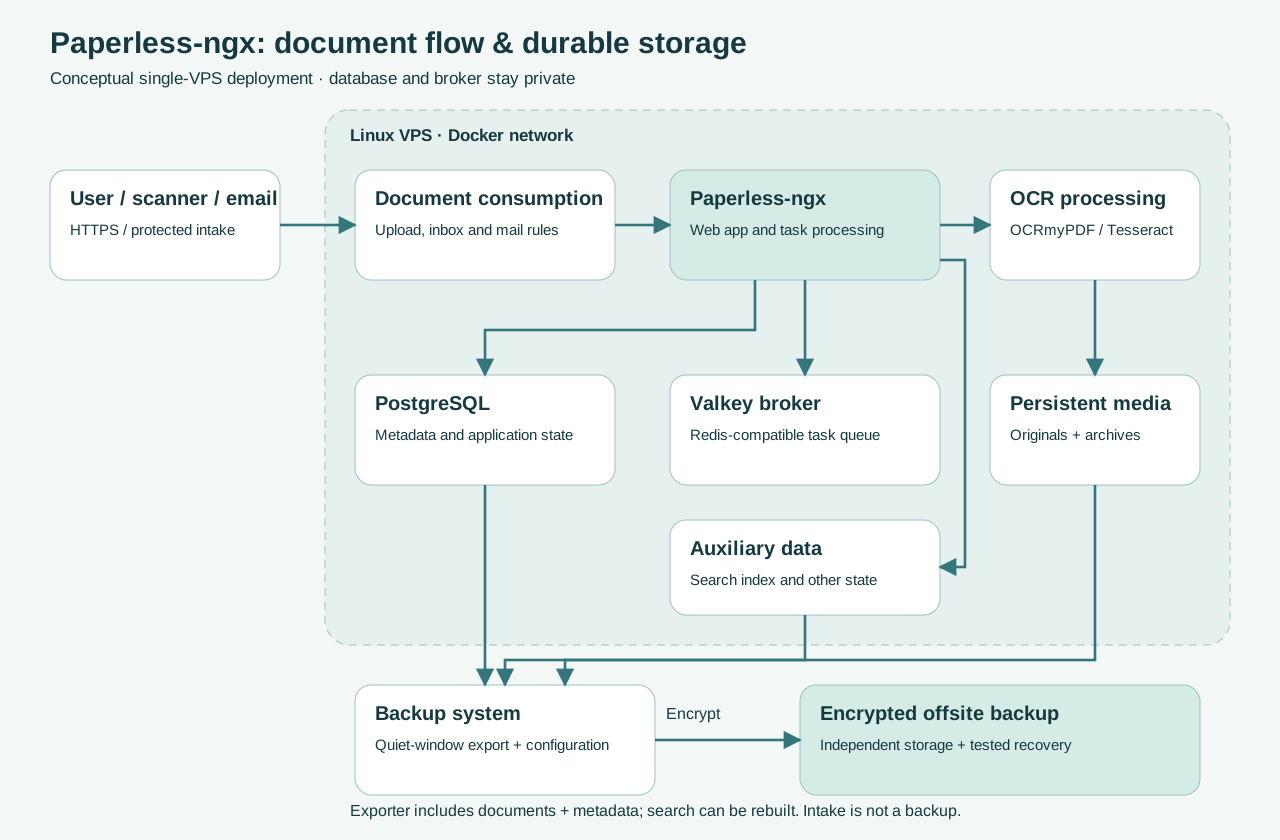
Follow the official administration guide. The document exporter includes originals, archive files, thumbnails, metadata/settings and database contents; API tokens are excluded. Save Compose/environment configuration separately. Auxiliary search data in data can be rebuilt from restored documents and metadata; a volume-based recovery plan should also cover data, media and a consistent database backup.
For the exporter method, pause scanner/email/automation intake, stop user edits and wait until all processing tasks finish. Keep this maintenance window throughout export. Create enough temporary space first:
cd /opt/paperless
set -euo pipefail
umask 077
BACKUP_LABEL="$(date -u +%Y%m%dT%H%M%SZ)"
docker compose exec -T webserver document_exporter "../export/$BACKUP_LABEL"
Generate an age key on a trusted recovery computer using age-keygen -o recovery-key.txt; protect the private key there. On the VPS, replace the recipient below with its public age1... value. Use an offsite SSH destination you control:
AGE_RECIPIENT='REPLACE_WITH_YOUR_AGE_PUBLIC_RECIPIENT'
install -d -m 0700 /var/backups/paperless
BACKUP_FILE="/var/backups/paperless/$BACKUP_LABEL.tar.age"
set -euo pipefail
tar -C /opt/paperless -cf - "export/$BACKUP_LABEL" \
    docker-compose.yml docker-compose.env .env \
  | age -r "$AGE_RECIPIENT" -o "$BACKUP_FILE"
sha256sum "$BACKUP_FILE" > "$BACKUP_FILE.sha256"
scp "$BACKUP_FILE" "$BACKUP_FILE.sha256" backupuser@BACKUP_HOST:paperless/
Check every command's exit status and verify the remote checksum before considering the backup complete. Back up /etc/caddy/Caddyfile and any additional configuration through the same protected process. Resume intake after export succeeds. A failed pipeline requires investigation; an empty or incomplete file is not a recovery copy. Set retention on independent storage, and protect temporary unencrypted exports. Sensitive contracts, invoices and identification documents require restricted access and encrypted backups.
Test recovery on a separate fresh host with the same Paperless version, empty database and empty media/data volumes. Restore reviewed configuration, decrypt the archive on a trusted computer (age -d -i recovery-key.txt -o recovery.tar BACKUP.tar.age), inspect it and transfer its contents through SSH into the private new project directory. Do not extract over a live installation. Place the dated export under the new export directory, preserve UID/GID access, start the new database/broker, then run:
docker compose up -d db broker
docker compose run --rm webserver document_importer ../export/EXPORT_LABEL
docker compose up -d
docker compose exec webserver document_index reindex
Replace EXPORT_LABEL; import before creating a new administrator, since an importer requires an empty installation. Verify logins, document counts, original/archive checksums, tags, search and a new test import. Regenerate API tokens. Preserve the old server and DNS until recovery passes. This exporter procedure avoids copying a live PostgreSQL data directory; provider snapshots alone do not establish database/media consistency.
Paperless-ngx vs Other Document Management Tools
| Tool | Setup Complexity | OCR | Organization | Hardware Planning | Best For |
|---|---|---|---|---|---|
| Paperless-ngx | App, database and broker | OCRmyPDF/Tesseract integration | Tags, correspondents, workflows | Size OCR concurrency and media | Personal/family searchable archives |
| Mayan EDMS | Broader administration and workflow setup | OCR/text recognition | Versioning, permissions, workflows | Assess chosen deployment and workers | Teams needing document process controls |
| Docspell | REST server plus processing component | Automatic text extraction/OCR | Tags and metadata | Budget processing jobs and JVM services | Automated intake and organization |
These are feature/deployment comparisons, not equivalent-machine benchmarks. Review each project's current installation guide before choosing; broader workflow features can justify more administration.
Security and Privacy Considerations
Use HTTPS, strong passwords, built-in account two-factor authentication and offline recovery codes. Give everyday users only necessary document permissions; reserve superuser access for administration. A self-hosted password vault can help manage credentials, but it needs separate protection and backups.
Restrict database/broker access to the private Docker network. Protect SSH, provider accounts, backup credentials and configuration files. Avoid exposing an unrestricted scanner share. Review pinned application releases and major-version migration notes, export before upgrades, and update Docker/OS regularly. PostgreSQL major upgrades require their own migration procedure; changing an image tag does not migrate its data directory.
A VPS does not make sensitive documents inherently safe. Server or provider-account compromise can expose stored files. Document your recovery objectives and test offsite restores. For a private household archive, a VPN or trusted-network access policy may be preferable to unrestricted public reachability.
Common Paperless-ngx Problems
| Problem | Safe Diagnostic Direction |
|---|---|
| Container will not start | Check docker compose ps, recent logs, env syntax and image architecture; avoid deleting volumes |
| OCR missing or inaccurate | Verify installed languages, selected codes and mode; inspect one harmless scanned sample |
| Documents not appearing | Check intake permissions, task queue and successful consumption; inspect duplicates before re-uploading |
| PDF import failed | Read the task error; check encryption, corruption and page/image size on a copy |
| PostgreSQL connection failure | Check db health, service hostname and matching passwords; do not reset an existing database |
| Redis/Valkey connection issue | Check broker health and PAPERLESS_REDIS; do not expose 6379 as a workaround |
| Out of memory | Inspect docker stats, kernel OOM logs and concurrency; reduce jobs or add RAM |
| Disk full | Check df -h, df -i and export growth; preserve originals before moving reviewed backups |
| Permission errors | Verify UID/GID on consume/export and external media mounts; avoid world-writable permissions |
| Proxy upload failure | Check every proxy/CDN size and timeout limit plus application logs; test a smaller harmless PDF |
| Search misses existing files | Check successful OCR and task logs; run documented document_index reindex after a backup |
Which VPS Is Best for Paperless-ngx?
LightNode Agency has the lowest verified recommended-plan monthly reference in this comparison at $14.70, and offers flexible hourly billing. That excludes unverified Hetzner/Contabo quotes, regional surcharges and backup/storage additions. Its 50GB disk suits a small personal archive only while measured growth fits.
For regular OCR, evaluate 2 vCPU/4GB with conservative concurrency. Vultr's $20 base-region 80GB plan provides more included disk; DigitalOcean and Akamai each list 2-vCPU/4GB/80GB options at $24. Frequent scanning or small-business use may justify 4-vCPU/8GB, controlled access and a defined recovery plan. Larger libraries need a quoted media volume and matching offsite retention regardless of provider.
Frequently Asked Questions
What is the best VPS for Paperless-ngx?
Choose from measured OCR demand and usable storage. LightNode Agency is the lowest verified recommended-plan reference here; Vultr, DigitalOcean and Akamai offer larger included disks at higher listed prices.
How much RAM does Paperless-ngx need?
This guide estimates 2GB for careful small-library evaluation and 4GB for routine OCR, including core containers and Linux. These are planning suggestions, not universal official minimums.
Can Paperless-ngx run on a 2GB VPS?
It can be evaluated with low concurrency and modest files. Large scans, extra languages or conversion services may exceed available RAM; monitor actual peaks.
Does Paperless-ngx require PostgreSQL?
No. SQLite and MariaDB are supported too. Official documentation recommends PostgreSQL for new installations; this tutorial uses its template.
Does Paperless-ngx need Redis?
It needs a Redis-compatible broker for background processing. The verified official template uses Valkey rather than requiring Redis specifically.
How much storage does Paperless-ngx use?
Add originals, possible archive copies, auxiliary data and operational headroom. Measure representative imports; document count alone cannot predict disk use.
Is Paperless-ngx free to self-host?
The project is open-source under GPL-3.0. You still pay for compute, usable storage, independent backups and administration.
Can Paperless-ngx OCR scanned PDFs?
Yes. Local OCR uses OCRmyPDF/Tesseract. Correct language packages and sufficient processing resources affect results.
How do I back up Paperless-ngx?
Use the official exporter during a quiet maintenance window, save configuration, encrypt offsite copies and test the importer on an empty installation running the matching version.
Can I host Paperless-ngx on Ubuntu?
Yes. A supported Ubuntu host with Docker Engine and the Compose plugin can run the official container stack. Keep the web port private behind HTTPS.
For a small archive, begin with measured files and conservative OCR settings. Budget 2-vCPU/4GB for regular work, increase memory or CPU when monitoring justifies it, and buy storage for both originals and processed documents. A tested encrypted recovery copy belongs in the monthly budget from the start.