
Best VPS for Uptime Kuma in 2026: Hosting Costs & Setup Guide
The best VPS for Uptime Kuma is usually a small Linux server with persistent local storage, enough memory for your checks, and infrastructure separate from the services it watches. Uptime Kuma provides a web dashboard for availability checks, notifications, and public status pages. Self-hosting gives you control over that configuration and its history without charging a software subscription for each monitored website.
A normal VPS can run it through Docker, but the cheapest advertised server is only part of the decision. You also need working alert delivery, a protected administrator account, recoverable data, and a plan for the monitoring server itself going offline. Putting everything on your application server saves one bill while creating a shared failure point.
This guide compares six hosting providers, explains resource estimates, and walks through a secure Ubuntu deployment. Costs include backup assumptions so you can budget beyond the software's free license.
Verified October 27, 2026. Latest stable release checked: Uptime Kuma 2.5.8, including security fixes. These are source-based recommendations, not purchased-server performance tests. The LightNode product link is an affiliate link; we may earn a commission.
Best VPS for Uptime Kuma: Quick Comparison
Prices exclude tax and optional extras unless stated. These are sensible starting configurations, not every provider's lowest entry plan. Catalog listings do not guarantee regional capacity or account eligibility.
| Provider | Recommended Plan | vCPU | RAM | Storage | Monthly Cost | Billing Model | Best For |
|---|---|---|---|---|---|---|---|
| LightNode | Start | 1 | 2 GB | 50 GB NVMe | $7.71 displayed reference | Hourly; server-fee cap | Flexible hourly hosting |
| Hetzner | CPX12, when available | 1 | 2 GB | 40 GB NVMe | Check current pricing | Hourly; monthly cap | EU deployment after quote check |
| DigitalOcean | Basic Regular 2 GiB | 1 | 2 GiB | 50 GiB SSD | $12 | Per-second; monthly cap | Documented first deployment |
| Vultr | vc2-1c-2gb | 1 | 2 GB | 55 GB SSD | $10 base region | Hourly; monthly cap | Regional selection |
| Akamai Cloud / Linode | Linode 2GB | 1 | 2 GB | 50 GB SSD | $12 base region | Hourly; monthly cap | General-purpose monitoring |
| Contabo | Cloud VPS 4 | 4 | 8 GB | 100 GB SSD | Check current pricing | Order-specific subscription | Larger resource allocation |
Sources: LightNode plans, Hetzner catalog, DigitalOcean pricing, Vultr public plan API, Akamai type API, and Contabo specifications.
What Is Uptime Kuma?
Uptime Kuma is an open-source, self-hosted uptime monitoring application. HTTP/HTTPS checks test web endpoints; keyword and JSON checks inspect responses. TCP checks test reachable ports, Ping tests ICMP reachability, and DNS checks inspect records. Response-time charts, HTTPS certificate information and expiry notifications, configurable notifications, and multiple status pages help communicate problems.
A successful TCP connection does not prove an application's business logic works. Add an HTTP health endpoint or response-content assertion where appropriate. Version 2.5.8 removed the unreliable TLS option from TCP monitoring; use HTTPS checks for web certificate monitoring.
Uptime Kuma VPS Requirements
Minimum CPU and RAM
There is no universal official CPU/RAM minimum that guarantees every workload. The following editorial planning estimates include room for Linux, Docker, and a proxy. Uptime Kuma RAM requirements concern the monitor host; your application or AI model needs its own resources.
Recommended VPS Configurations
| Workload | Starting Configuration | Evaluate Before Expanding |
|---|---|---|
| Small personal setup | 1 vCPU / 1 GB RAM | A few HTTP, Ping or TCP checks; actual memory headroom |
| Small/medium deployment | 1–2 vCPU / 2 GB RAM | Multiple websites/APIs, notifications and status pages |
| Denser checks or longer history | 2 vCPU / 4 GB RAM | Database growth, CPU peaks and query latency |
| Browser checks or complex integrations | Workload-specific sizing | Chromium, concurrency and database backend |
No row promises a fixed monitor count. Measure memory, swap, CPU, disk space and application responsiveness over representative traffic.
Storage Requirements
Use local SSD/NVMe for /app/data, with POSIX file locking. The installation warning specifically addresses SQLite corruption risks on unsuitable filesystems, including NFS. Leave space for the OS, images, database, logs, upgrades and a temporary backup archive. A 25–50 GB system disk is a practical starting allocation, not a guaranteed retention capacity.
Monitoring Frequency and Resource Usage
Monitor count, monitor type and check interval all matter. Halving an interval roughly doubles scheduled attempts for those checks; retries and failures add work. Browser-based checks can consume substantially more memory than simple HTTP requests. Database size, historical data, retention period, notification rules and public status-page traffic also affect demand. Resource growth is not simply linear with monitor count.
Start ordinary availability checks at 60 seconds and tune after measurement. Review retention controls under Settings → Monitor History in the current UI; reducing retention sacrifices older history and does not replace a backup.
Does Uptime Kuma Need a Dedicated VPS?
It needs neither a dedicated physical machine nor proximity to the application. A separate small VPS is useful because it survives some application-host failures. If your n8n workflows or Open WebUI deployment exhaust their host's RAM, an independent monitor can still raise an alert.
6 Best VPS Providers for Uptime Kuma in 2026
All six offer Linux virtual machines with administrative/SSH access on which you can install Docker yourself. Confirm the chosen image, IPv4, backup options and regional inventory at checkout.
1. LightNode – Best for Flexible Hourly Billing
LightNode hourly VPS suits independent website/API checks, status pages and temporary monitoring experiments. Start combines 1 vCPU, 2 GB RAM, 50 GB NVMe and 1 TB advertised traffic at a $7.71 monthly reference. Agency offers 2 vCPU/4 GB at $14.70 if measurement justifies more memory.
Linux, root access and locations across several continents give deployment flexibility. The dedicated-IP listing includes a dedicated static address; confirm your selected order's terms. This is a normal Linux VPS installation, not a verified Uptime Kuma one-click product.
The billing FAQ describes a 672-hour server-fee cap within a complete calendar month. Stopped instances remain billable; traffic-plan rules are separate. Confirm the final traffic and backup quote. Infrastructure independence comes from your placement choices, not automatically from buying this plan.
2. Hetzner – Best for EU Deployment After Availability Checks
CPX12 lists 1 vCPU, 2 GB RAM and 40 GB NVMe. However, the public catalog returned blank prices and unavailable labels during verification. Consequently, this guide does not call it the cheapest purchasable option or publish an older promotional quote.
The catalog lists EU locations and Singapore, with different transfer allowances: CPX12 shows 20 TB in EU locations versus 0.5 TB in Singapore. Primary IPv4 costs €0.50/month excluding VAT; confirm the combined server and backup quote. Backups exclude attached Volumes. Choose it when suitable capacity and total pricing are confirmed; our Hetzner alternatives guide covers other options.
3. DigitalOcean – Best for a Documented First Deployment
Basic Regular 2 GiB costs $12/month with 1 vCPU, 50 GiB SSD and 2,000 GiB transfer. The $4/512 MiB entry is cheaper but below this guide's planning baseline; the $6/1 GiB plan is an evaluation option.
Ubuntu documentation and predictable plan sizes help a first installation. Standard primary IPv4 is included with the Droplet; extra networking products can cost more. DigitalOcean uses per-second billing with a minimum of 60 seconds or $0.01, whichever is greater, and monthly caps. Weekly percentage-based backups cost 20%; daily backups cost 30%. Select an available region across its Americas, Europe or Asia-Pacific footprint. You still maintain the application.
4. Vultr – Best for Regional Deployment Options
The public API lists vc2-1c-2gb at $10/month or $0.014/hour: 1 vCPU, 2 GB RAM, 55 GB SSD and 2,048 GB transfer. Its smaller 1 GB/25 GB plan is $5 base pricing. The recommended plan's São Paulo override is $15, illustrating why region selection matters.
The catalog includes locations across the Americas, Europe, Asia-Pacific and other regions. Choose the IPv4-enabled standard plan rather than assuming every cheapest offer includes IPv4. Automatic backups start at 20% of instance cost. Region listings indicate product coverage, not guaranteed spare capacity or measured latency.
5. Akamai Cloud – Best for General-Purpose Hosting
Linode 2GB provides 1 vCPU, 2 GB RAM, 50 GB disk and 2,000 GB transfer for $12/month or $0.018/hour at base-region rates. Its API quotes backups at $2.50/month. Nanode 1GB starts at $5, with $2 backups, for lighter evaluation workloads.
Included primary IPv4, Linux images and SSH access support straightforward Docker hosting. Regions span the Americas, Europe and Asia-Pacific, but Jakarta and São Paulo carry different rates: the 2 GB API quote is $14.40 and $16.80 respectively. Check regional availability, backup scope and transfer overages through Akamai pricing.
6. Contabo – Best for Larger Resource Configurations
Current documentation lists Cloud VPS 4 with 4 shared vCPUs, 8 GB RAM, 100 GB SSD and a 200 Mbit/s port. Cloud VPS Plus 4 instead offers 150 GB NVMe and a 500 Mbit/s port. Those are different products.
The larger allocations may suit history-heavy monitoring after testing, but RAM alone proves nothing about check latency. Linux/root access and static IPv4 support manual deployment. Traffic is advertised as unlimited subject to fair use. Regions, minimum term, renewal, setup fees and Auto Backup pricing need an order-specific check; the public pricing page could not be verified. Do not compare an unconfirmed headline offer against the other providers' monthly totals.
How to Install Uptime Kuma on an Ubuntu VPS
Use a fresh Ubuntu 24.04 LTS 64-bit VPS and an SSH key. This procedure follows official documentation; it has not been runtime-tested on a purchased VPS. Use a current supported Docker Engine and Compose plugin. The reviewed Kuma installation page does not state a universal numeric Docker minimum; do not confuse its native Node.js requirement with Docker's version.
1. Connect, update and install Docker
Replace the IP and SSH user with the provider's values:
ssh ubuntu@YOUR_SERVER_IP
sudo apt update
sudo apt upgrade -y
sudo apt install -y ca-certificates curl
sudo install -m 0755 -d /etc/apt/keyrings
sudo curl -fsSL https://download.docker.com/linux/ubuntu/gpg -o /etc/apt/keyrings/docker.asc
sudo chmod a+r /etc/apt/keyrings/docker.asc
sudo tee /etc/apt/sources.list.d/docker.sources > /dev/null <<EOF_DOCKER
Types: deb
URIs: https://download.docker.com/linux/ubuntu
Suites: $(. /etc/os-release && echo "${UBUNTU_CODENAME:-$VERSION_CODENAME}")
Components: stable
Architectures: $(dpkg --print-architecture)
Signed-By: /etc/apt/keyrings/docker.asc
EOF_DOCKER
sudo apt update
sudo apt install -y docker-ce docker-ce-cli containerd.io docker-buildx-plugin docker-compose-plugin
sudo docker run --rm hello-world
sudo docker compose version
Docker's Ubuntu guide covers conflicting existing packages and firewall limitations. Reboot if system updates require it, then reconnect.
2. Create the Compose file and persistent volume
sudo install -d -m 0755 /opt/uptime-kuma
cd /opt/uptime-kuma
sudo tee compose.yaml > /dev/null <<'EOF_COMPOSE'
services:
  uptime-kuma:
    image: louislam/uptime-kuma:2
    container_name: uptime-kuma
    restart: unless-stopped
    ports:
      - "127.0.0.1:3001:3001"
    volumes:
      - uptime-kuma:/app/data

volumes:
  uptime-kuma:
EOF_COMPOSE
sudo docker compose config
sudo docker compose up -d
sudo docker compose ps
sudo docker compose logs --tail=100 uptime-kuma
Compose creates the named volume automatically. Keep the same project directory/name when recreating it. This adapts the official Compose template by binding the published port to loopback. The recommended :2 tag tracks stable v2; pin a reviewed release or digest when you need reproducible upgrades.
3. Create the administrator privately, then enable HTTPS
Run this on your own computer, keeping the tunnel open:
ssh -N -L 33001:127.0.0.1:3001 ubuntu@YOUR_SERVER_IPOpen http://127.0.0.1:33001, complete first-run database setup using SQLite for this guide, and create a unique administrator password. Enable 2FA. Administrator access controls monitoring and stored credentials; do not assume public status-page visitors have dashboard privileges or that Kuma supplies granular team roles.
For remote access, point monitor.example.com at the VPS. Install Caddy using its official Ubuntu package instructions. Generate a separate proxy password hash with caddy hash-password, then save this in /etc/caddy/Caddyfile, replacing both placeholders:
monitor.example.com {
    basic_auth {
        operator REPLACE_WITH_CADDY_PASSWORD_HASH
    }
    reverse_proxy 127.0.0.1:3001
}
sudo caddy validate --config /etc/caddy/Caddyfile
sudo systemctl reload caddy
curl -I https://monitor.example.comAn unauthenticated request should receive 401; verify authorized browser access too. Caddy handles HTTPS and WebSocket proxying. Permit public TCP 80/443 for this configuration, restrict SSH to trusted sources, and keep 3001 private at both host and provider firewalls. Correct DNS and certificate-challenge reachability are required. Docker-published ports can bypass UFW, which makes the loopback binding important.
This example protects the whole site, including status pages and Push endpoints. Keep that protection unless you deliberately design and test selective public access. Kuma requires a hostname rather than a subdirectory; see the reverse-proxy guide.
4. Check persistence
Create a test monitor, run sudo docker compose restart, and confirm it remains. Then sudo docker compose up -d --force-recreate verifies container recreation with the same volume. Neither operation is a backup; never add down -v to an update procedure.
How to Monitor a Website with Uptime Kuma
Choose Add New Monitor, select HTTP(s), name it, and enter an endpoint you control, such as https://example.com/health. Start Heartbeat Interval at 60 seconds, Request Timeout at 10 seconds, and choose retries deliberately. These fields were checked against the 2.5.8 monitor editor.
Select a notification, save, and inspect response history. Use a keyword or JSON query when an HTTP 200 could contain an application error. Create a status page, add a group and selected monitors, and save it. Review exposed names and addresses before making it public; the proxy above keeps it private by default.
Test a disposable staging endpoint: make it return an error, confirm a real failure notification, restore it, and confirm recovery. A notification provider's Test button alone does not verify monitor assignment or outage detection. Never interrupt production just to test alerts.
How to Set Up Notifications
The current notification providers include Email (SMTP), Telegram, Discord, Slack and Webhook. Each has its own credentials, permissions and delivery limits.
For SMTP, choose Setup Notification → Email (SMTP). Enter your mail service's host, its documented TLS mode/port, a dedicated username/password, an authorized From address and your recipient. For example, smtp.example.com:587 is a placeholder for a service using STARTTLS; port 465 generally uses implicit TLS. Match your provider's actual settings. Send a test, check receipt/spam, save, then enable it on the monitor. Protect credentials and check outbound SMTP restrictions. Keep at least one alert channel outside your application's failure domain.
Why You Should Host Uptime Kuma Separately
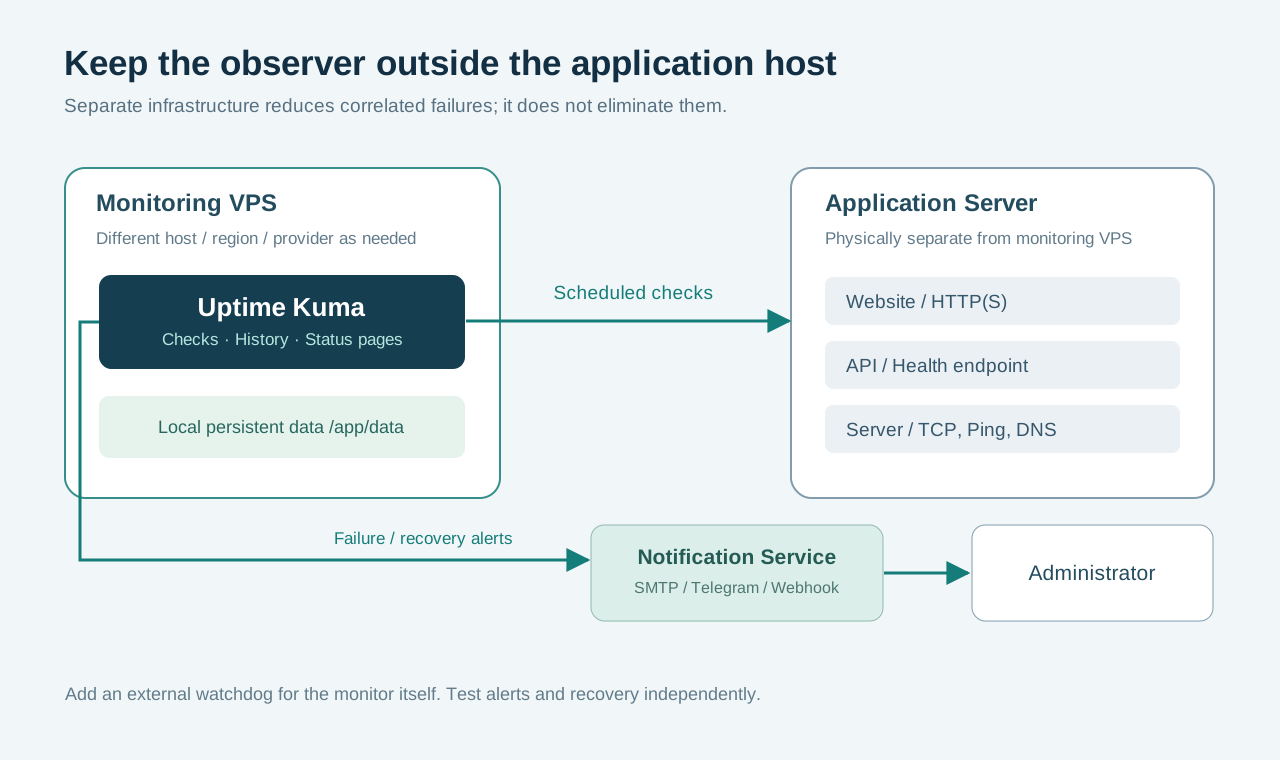
Same-host monitoring loses its observer when that host crashes. Separate VMs in one data center can still share power or network failures; separate regions reduce some correlations, while separate providers reduce others. Neither arrangement guarantees independence from DNS, upstream transit or your notification service.
An offline Kuma instance cannot reliably announce its own failure. Add an external HTTPS check of a deliberately reachable endpoint, or a host-scheduled heartbeat to an independent service. Better Stack's verified free allowance includes ten monitors/heartbeats combined; match its expected interval and grace period. Kuma's Push monitor receives heartbeats into Kuma—it is not an automatic outbound watchdog. Secure heartbeat URLs as credentials.
If using Coolify or Dokploy to manage applications, place the observer outside the managed application host where practical.
Uptime Kuma Hosting Costs Explained
Software is free; uptime monitoring VPS infrastructure and administration are not. Budget IPv4 if excluded, a domain if needed, backup storage, database growth and outbound traffic. TLS certificates can be free. Your existing domain can supply a subdomain without a second registration.
The examples use verified base-region monthly caps, not a generic 730-hour multiplication. Domain and independent-backup reserves below are editorial assumptions, not vendor quotes. Labor, tax, paid messaging and overages are excluded.
| Scenario | Example VPS Configuration | VPS Cost | Backup Cost | Additional Costs | Estimated Monthly Total |
|---|---|---|---|---|---|
| A: Personal website monitoring | Akamai Nanode, 1 vCPU/1 GB | $5 | $2 provider backup | $0–$2 independent backup reserve; existing subdomain | $7–$9 |
| B: Small business monitoring | DigitalOcean, 1 vCPU/2 GiB | $12 | $2.40 weekly plan | $1–$3 independent backup; $1–$2 domain reserve | $16.40–$19.40 |
| C: Multiple websites and APIs | DigitalOcean, 2 vCPU/4 GiB | $24 | $7.20 daily plan | $2–$5 independent backup; $1–$2 domain reserve | $34.20–$38.20 |
Provider disk backups complement an application-consistent data archive; they do not automatically prove SQLite consistency. LightNode's $7.71 reference can be another 2 GB starting option, but obtain its backup/traffic quote before calculating a complete total. Compare broader entry plans in our cheap VPS guide.
Uptime Kuma vs Better Stack vs UptimeRobot
| Factor | Uptime Kuma | Better Stack | UptimeRobot |
|---|---|---|---|
| Hosting / setup | Your VPS; Docker and proxy setup | SaaS; configure endpoints | SaaS; configure endpoints |
| Notifications | Configured integrations; you maintain delivery | Email/Slack; paid on-call features | Email and plan-dependent integrations |
| Monitoring locations | Your host's vantage point | Provider-operated checks | Provider-operated locations; features vary by plan |
| Status pages | Self-hosted; you control exposure | One included on verified free allowance | Free/paid features differ; Solo lists three custom-domain pages |
| Maintenance | OS, containers, backups and recovery are yours | Provider maintains monitoring platform | Provider maintains monitoring platform |
| Pricing structure | Free software plus infrastructure | Free allowance; responder/add-on pricing | Free allowance; monitor tiers and billing period |
| Best for | Control and private-network checks | Monitoring with incident/on-call workflows | Managed website checks without a VPS |
Better Stack pricing lists ten monitors/heartbeats and one status page free; a responder starts at $34 monthly or $29/month billed annually. UptimeRobot pricing lists 50 free monitors at five-minute intervals; Solo shows ten monitors at $13 monthly or $12/month annually with 60-second checks. Check current eligibility and extras. Kuma does not include a global independent probe network merely because its VPS provider has many regions.
Uptime Kuma Security and Backups
Keep HTTPS, WebSockets, 2FA and strong passwords working. Restrict administration through a VPN, access gateway or the proxy protection above. Do not expose Docker's socket merely to add container monitoring; that grants substantial host control. Store notification secrets and backups privately.
For this SQLite setup, stop writes and archive all /app/data, not only Compose. A named-volume example, run from /opt/uptime-kuma:
sudo install -d -m 0700 /var/backups/uptime-kuma
sudo docker compose stop uptime-kuma
sudo docker run --rm --volumes-from uptime-kuma:ro \
  -v /var/backups/uptime-kuma:/backup ubuntu:24.04 \
  tar -czf /backup/data-$(date -u +%Y%m%dT%H%M%SZ).tgz -C /app/data .
sudo docker compose start uptime-kuma
sudo chmod 0600 /var/backups/uptime-kuma/*.tgz
Check the archive command succeeded before treating it as a backup; restart Kuma even if archiving fails. Copy the archive and Compose configuration to encrypted off-host storage, and test restoration on an isolated instance using the same reviewed image version. Restore into a new empty local volume while the destination service is stopped; preserve ownership, attach that volume at /app/data, then verify monitors, history and notifications. Disable outgoing alerts on the test instance before it can send duplicates. External databases require their own consistent backup procedure.
Before updates, read release notes, take a stopped-data backup, then pull and recreate the service. Monitor startup logs. The v1→v2 migration guide removes JSON backup/restore and warns against interrupting migration. Keep the original data backup for recovery; changing the image back does not undo a database migration. Schedule maintenance and verify the external watchdog during downtime.
Common Uptime Kuma Problems
| Problem | Safe Diagnostic Steps |
|---|---|
| Dashboard not loading | Check docker compose ps, recent logs and local curl -I http://127.0.0.1:3001; then inspect proxy/DNS |
| Port 3001 inaccessible remotely | Expected with loopback binding; use the SSH tunnel or authenticated HTTPS hostname |
| Container restarting | Inspect logs and docker inspect uptime-kuma; check OOM state, free -h and free disk |
| Notifications not arriving | Run a provider test; check monitor assignment, credentials, recipient permissions, egress and delivery logs |
| False downtime | Compare a request from the monitor host; inspect DNS, timeout, rate limits and retries before relaxing checks |
| WebSocket disconnects | Inspect browser network errors and proxy logs; preserve upgrade support and avoid unsupported subpaths |
| SQLite database errors | Stop writes, preserve data, check local filesystem locking, disk space and backup integrity; do not delete database files |
| Data missing after upgrade | Compare container mounts and Compose project name; locate the original volume before creating more data |
| Permission problems | Inspect volume ownership and image variant; do not apply blanket world-writable permissions |
| SSL certificate warnings | Check hostname, certificate chain, system clock and expiry; repair trust instead of disabling verification globally |
Which VPS Is Best for Uptime Kuma?
For the lowest verified 1 GB base monthly price, Vultr and Akamai tie at $5 in the checked catalogs. LightNode offers a 2 GB hourly starting point at a $7.71 displayed monthly reference. DigitalOcean is an approachable choice when you value its installation documentation. Check inventory and your full bill before ordering.
For an independent monitoring server, choose a different failure domain from your application regardless of brand. For more monitors, measure the 2 GB baseline before moving to 4 GB or larger. For long-term monitoring, prioritize consistent backups, retention planning and tested recovery over unused RAM. Contabo merits comparison for larger allocations once its complete order is verified; Hetzner requires a live availability and price check.
Frequently Asked Questions
What is the best VPS for Uptime Kuma?
A separately hosted Linux VPS with suitable local storage and recoverable data. Choose the provider by location, total cost and maintenance needs.
How much RAM does Uptime Kuma need?
This guide estimates 1 GB for small evaluations and 2 GB for more headroom. Browser checks and larger databases require measurement.
Can Uptime Kuma run on a 1GB VPS?
It can be evaluated there for simple checks, but no fixed monitor count or memory guarantee applies.
Is Uptime Kuma free?
Yes, its MIT-licensed software is free. Hosting, backups and some notification services cost money.
Does Uptime Kuma require Docker?
No. Native installation is supported, with its own Node.js and process-management requirements. Docker simplifies this guide's deployment.
Can I host Uptime Kuma on Ubuntu?
Yes. Use a supported 64-bit Ubuntu release and compatible current Docker packages.
Can Uptime Kuma monitor multiple websites?
Yes. Configure separate monitors with appropriate checks, intervals and notification assignments.
How much does Uptime Kuma hosting cost?
Verified 1 GB base plans start at $5/month here. The example personal budget including provider backup is $7–$9 before tax and labor.
Should Uptime Kuma run on a separate server?
Preferably, especially for production. A separate provider or region can reduce correlated failures further.
How do I back up Uptime Kuma?
Stop the service, archive its complete persistent data, retain configuration, copy it off-host and test recovery. Do not rely on old JSON export instructions.
Conclusion
Start with a measured 1–2 GB deployment: Vultr or Akamai for verified $5 evaluation plans, LightNode for flexible 2 GB hourly hosting, or DigitalOcean for a documented setup. Scale for observed demand and keep monitoring independent from the services it watches. A tested alert path and restorable data matter more than a large unused server.