
Best VPS for NocoDB in 2026: Pricing & Setup Guide
NocoDB turns relational data into a spreadsheet-style workspace with views, forms, permissions, automations, and APIs. Its single-server stack includes the app, worker, PostgreSQL, Redis, and Traefik.
The best VPS for NocoDB needs memory, persistent SSD storage, backups, and a domain. This guide compares prices, requirements, installation, security, backup, and updates.
Checked November 13, 2026. NocoDB 2026.10.1 and the current self-hosting documentation were reviewed. Provider prices exclude tax and optional services unless stated. No purchased-server benchmarks are claimed. The LightNode links are affiliate links; we may earn a commission at no additional cost to you.
What Is NocoDB?
NocoDB organizes relational data through grids, forms, filtered views, linked records, collaboration, automations, and APIs. It fits internal tools, project tracking, operational databases, and no-code applications. Community covers core self-hosting, while SSO, advanced permissions, audit logs, row-level security, air-gapped deployment, and priority support depend on paid plans.
The 2026 license change
Current releases are source-available under the Fair Code Sustainable Use License (SUL), not an OSI-approved open-source license. Versions 0.301.0 and later moved away from AGPL-3.0 in January 2026; the repository license was updated on January 29. The SUL covers personal, non-commercial, and internal business use subject to its terms. Hosting or managing NocoDB for third parties may require commercial permission. Review the official license.
Community software has no per-seat infrastructure charge, but that does not make every NocoDB feature free. The self-hosted Business plan is publicly listed from $24 per editor per month when billed annually or $30 monthly; Scale and Enterprise add governance and deployment features under their current terms. Software licensing and VPS infrastructure are separate costs.
NocoDB VPS Requirements
The official self-hosting page lists the following minimum and production recommendations. The middle row is our editorial starting point for a light team, not an official NocoDB tier.
| Deployment | CPU | RAM | Disk |
|---|---|---|---|
| Official minimum | 2 vCPU | 2 GB | 10 GB |
| Small team (editorial recommendation) | 2 vCPU | 4 GB | 30–50 GB SSD |
| Official production recommendation | 4 vCPU | 8 GB | 50 GB+ |
Two vCPU can run a small stack, but imports, exports, automations, API traffic, and database queries can overlap with background jobs. Four vCPU gives a production deployment more scheduling room. Shared vCPU plans are reasonable for modest, bursty use; consistent CPU-heavy workloads may justify dedicated cores.
Memory must cover Linux, Docker, NocoDB, its worker, PostgreSQL, Redis, and Traefik. Storage must include database data, attachments, volumes, logs, image layers, upgrade space, and free reserve. Keep backups off-host; a same-account snapshot is not independent. Size from measured growth, concurrency, attachments, and automation load rather than a promised user count.
Can NocoDB run on a 2 GB RAM VPS?
Yes, 2 GB is the current official minimum, paired with 2 vCPU and 10 GB disk. It is suitable for evaluation or a tightly controlled low-volume deployment, not a guarantee for production. The bundled PostgreSQL, Redis, worker, and reverse proxy leave limited burst capacity. Monitor memory pressure, swap activity, container restarts, and job queues; move to 4 GB or more when real workloads approach the limit.
Is 4 GB RAM enough for NocoDB?
Four GB is a practical editorial starting point for a light individual or small-team deployment with modest data and attachments. It is above the official minimum but below NocoDB's official 8 GB production recommendation. For a business-critical service, start with 4 vCPU and 8 GB unless measured usage supports a smaller design.
How Much Does NocoDB Hosting Cost?
NocoDB self-hosting cost combines compute, SSD storage, offsite backups, a domain, outbound transfer, monitoring, maintenance time, and any paid NocoDB license. Let's Encrypt certificates are free, but operating HTTPS is not maintenance-free. A managed PostgreSQL or Redis service adds a separate bill while reducing some database administration work.
| Scenario | Suggested infrastructure | Approximate monthly infrastructure* | Software license |
|---|---|---|---|
| Budget personal server | 2 vCPU, 2–4 GB, 30–50 GB SSD | $10–$25 | Community: no per-seat fee, subject to SUL |
| Small team | 2–4 vCPU, 4–8 GB, 50–100 GB SSD plus offsite backup | $20–$65 | Community or paid plan as features require |
| Production deployment | 4+ vCPU, 8+ GB, 80 GB+ SSD, monitoring and tested backups | $40–$150+ | Business/Scale/Enterprise if required |
*Editorial estimates derived from the verified compute examples below plus a modest backup allowance. Tax, labor, licenses, domains, external databases, and traffic overages are excluded.
Community removes per-seat software fees for permitted use, not infrastructure or operations. Paid self-hosted licenses require PostgreSQL. Production also needs retained backups, monitoring, and tested restores.
Best VPS Providers for NocoDB in 2026
The recommended plans below meet or exceed the official 2 vCPU/2 GB minimum. For production, compare their 4 vCPU/8 GB options instead.
| Provider | Recommended Configuration | CPU | RAM | Storage | Starting Price | Best For | Visit Website |
|---|---|---|---|---|---|---|---|
| LightNode | Agency | 2 vCPU | 4 GB | 50 GB NVMe | $14.70/mo equivalent | Hourly billing and global locations | Visit |
| DigitalOcean | Basic Regular | 2 vCPU | 4 GiB | 80 GiB SSD | $24/mo | Documentation and developer tooling | Visit |
| Vultr | Regular Cloud Compute | 2 vCPU | 4 GB | 80 GB SSD | $20/mo base | Regional choice | Visit |
| Akamai Cloud / Linode | Linode 4GB | 2 vCPU | 4 GB | 80 GB | $24/mo base | Conventional Linux operations | Visit |
| Hetzner | CX23/CAX11 where available | 2 vCPU | 4 GB | 40 GB NVMe | From €5.49–€5.99/mo, excl. IPv4/VAT | Cost-focused EU deployments | Visit |
Prices were checked against official sources on November 13, 2026. Region, architecture, stock, IPv4, tax, backup, and transfer rules can change the final quote.
1. LightNode: Flexible hourly NocoDB hosting
LightNode
LightNode provides KVM Linux VPS instances with root access, static IPs, NVMe storage, hourly billing, and multiple global locations. It is infrastructure, not managed NocoDB.
Recommended configuration: Agency includes 2 vCPU, 4 GB RAM, 50 GB NVMe, and 2 TB advertised transfer for a $14.70 monthly equivalent. Premium includes 4 vCPU, 8 GB RAM, 50 GB NVMe, and 3 TB transfer for $27.70 equivalent, matching NocoDB's official production CPU and RAM recommendation. Add storage or external attachment capacity when 50 GB is insufficient.
Pros: hourly billing and regional choice. Cons: 50 GB needs growth planning; cryptocurrency payment is unsupported. Best for: flexible global deployments.
2. DigitalOcean: Established developer ecosystem
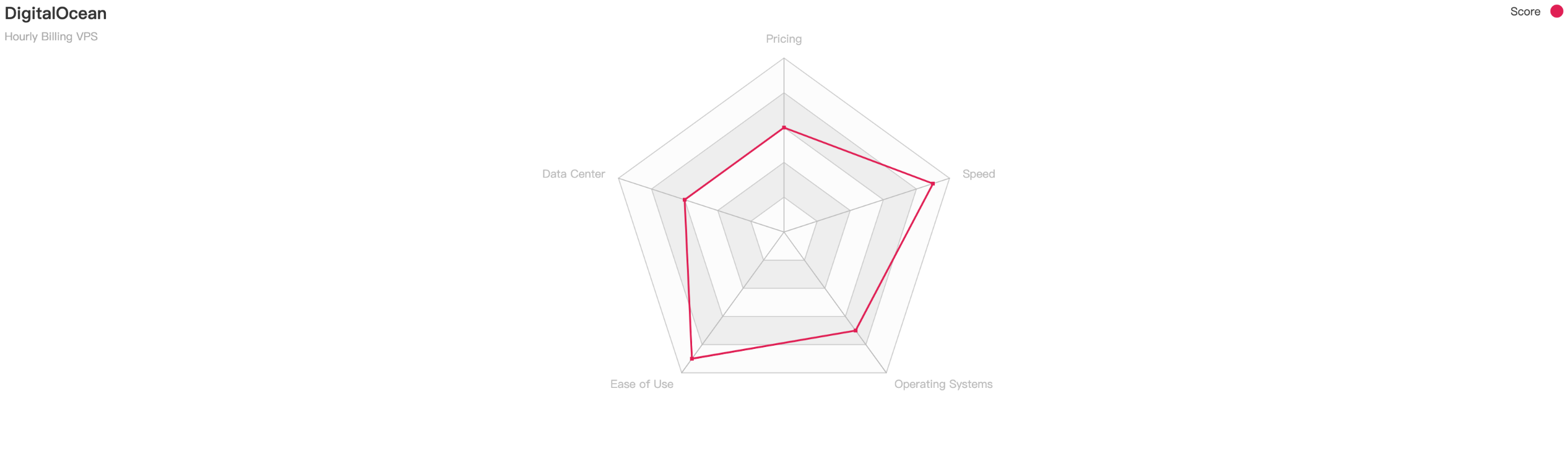
DigitalOcean Droplets combine Linux VMs with documentation, APIs, firewalls, volumes, and optional managed databases. The 2 vCPU/4 GiB/80 GiB plan is $24 monthly; 4 vCPU/8 GiB/160 GiB is $48. Weekly backups add 20% and daily backups 30%.
Pros: Clear public pricing, documentation, and a mature developer workflow. Cons: Backups add cost, and cheaper catalog plans do not meet NocoDB's two-vCPU minimum. Best for: developers who value documentation and integrated cloud services.
3. Vultr: Broad cloud location selection

Vultr Cloud Compute offers Linux VMs, firewalls, snapshots, APIs, and several compute families. Its regular 2 vCPU/4 GB/80 GB SSD plan has a $20 base monthly cap. Confirm regional pricing and disk type.
Pros: Many deployment locations and hourly compute options. Cons: Region and compute family can alter price and storage characteristics. Best for: placing a NocoDB server near a distributed team.
4. Akamai Cloud / Linode: Straightforward Linux instances

Akamai Cloud's Linode instances support SSH and Docker with APIs, firewalls, and documentation. In North America, Linode 4GB provides 2 vCPU, 80 GB storage, and 4 TB transfer for $24 monthly; Linode 8GB provides 4 vCPU and 160 GB for $48. Regional multipliers apply.
Pros: Predictable instance ladder and familiar Linux operations. Cons: Base-region prices are not universal, and backups cost extra. Best for: teams wanting conventional VM management.
5. Hetzner: Cost-focused European infrastructure

Hetzner's CX23 (x86) and CAX11 (Arm) list 2 vCPU, 4 GB RAM, and 40 GB NVMe. Germany/Finland reference prices are €5.49 and €5.99 monthly, excluding VAT and IPv4; availability is limited. Arm deployments require Arm64-compatible images.
Pros: Low published EU compute prices and large EU transfer allowances. Cons: Inventory, architecture, VAT, IPv4, and regional pricing require a live quote. Best for: cost-conscious European deployments that can handle availability and architecture constraints.
How to Install NocoDB on an Ubuntu VPS
NocoDB's single-server installer generates NocoDB, worker, PostgreSQL, Redis, and Traefik services. Use Ubuntu 24.04 LTS, Docker Engine, and Compose v2.
Step 1. Prepare the server and DNS
Provision at least 2 vCPU, 2 GB RAM, and 10 GB disk; 4 GB RAM and 30–50 GB SSD is a better small-team start. Use a sudo administrator and SSH keys, then point nocodb.example.com to the host.
sudo apt update
sudo apt upgrade -y
sudo apt install -y ca-certificates curl
Allow SSH from trusted sources and TCP 80/443 for HTTP validation and HTTPS. Do not expose PostgreSQL or Redis ports to the public internet.
Step 2. Install Docker Engine and Compose v2
Follow Docker's Ubuntu repository instructions rather than installing an obsolete docker-compose v1 package. After installing the maintained packages, verify both components:
sudo systemctl enable --now docker
sudo docker --version
sudo docker compose version
Step 3. Review the official installer
The official shortcut pipes a remote script to Bash. For a production host, download and inspect it first:
curl -fsSL https://install.nocodb.com/noco.sh -o noco.sh
less noco.sh
bash noco.sh --help
Verify the source before bash noco.sh; never substitute an unverified script. Automation supports --domain, --acme-email, --pg, --redis, and --image-tag.
Step 4. Install the single-server stack
Run the reviewed script and answer the prompts. Enter the real domain, choose bundled PostgreSQL and Redis for a self-contained server, and provide an operations email for Let's Encrypt. The documented one-line form is:
curl -fsSL https://install.nocodb.com/noco.sh | bashThe installer writes configuration under nocodb/ and uses named volumes for PostgreSQL, Redis, application data, and attachments. A real domain enables Traefik and Let's Encrypt. Bare-IP plaintext HTTP is not recommended for production.
Step 5. Verify every service
Do not stop at docker compose ps. Check containers, logs, the health endpoint, HTTPS, and an actual login:
cd nocodb
docker compose ps
docker compose logs --tail=100 nocodb worker postgres redis traefik
curl -fsS https://nocodb.example.com/api/v1/health
docker volume ls
Service names can change with installer revisions, so compare them with docker compose config --services. Confirm the certificate is valid, the worker stays healthy, PostgreSQL accepts internal connections, and Redis has no repeating errors.
Step 6. Create the administrator and first base
Open the HTTPS URL. The first registered user becomes super admin. Use a unique password stored in a password manager, configure workspace access, and restrict open registration if the current admin settings allow it. Create a base, add a table and fields, insert a test record, configure a view, and test a form or API call.
NocoDB's internal database and a connected external PostgreSQL source are separate. Back up each according to its role.
Step 7. Secure PostgreSQL, Redis, and Docker
Keep PostgreSQL and Redis on the private Compose network. Do not publish their ports. Protect docker.env, nocodb/db.json, secrets, and encryption keys; never commit them to Git. The installer applies restrictive permissions, which can be checked and restored with:
cd nocodb
chmod 600 docker.env nocodb/db.json
sudo ss -lntup
docker compose config --services
Limit ingress to SSH, 80, and 443, include IPv6, rotate logs, patch the OS, and monitor resources, restarts, health, and certificates. Docker-socket access is root-equivalent.
Step 8. Back up NocoDB correctly
A useful backup covers PostgreSQL, application attachments, configuration files, environment variables, and required encryption keys. Keep the archive encrypted off-host. For a consistent logical database backup, identify the generated database and user values from the protected configuration, then use pg_dump inside the PostgreSQL container. Adapt the service and database names from the generated Compose file:
cd nocodb
mkdir -p backups
docker compose exec -T postgres \
  pg_dump -U "YOUR_POSTGRES_USER" -d "YOUR_POSTGRES_DATABASE" \
  --format=custom > "backups/nocodb-$(date +%F).dump"
Back up the attachment volume using NocoDB's current maintenance guidance or a controlled volume archive, and copy docker-compose.yml, docker.env, nocodb/db.json, and the letsencrypt directory with appropriate secret handling. Do not copy a live PostgreSQL data directory and promise consistency. Never use docker compose down -v as a restart or backup command; -v deletes named volumes.
Test restoration on an isolated host: restore PostgreSQL with pg_restore, restore attachments and configuration, start the pinned application version, then verify login, bases, APIs, attachments, and background jobs. A backup that has never been restored is only an assumption.
Step 9. Update NocoDB safely
NocoDB 2026.10.1 was current at review. Pin a stable image rather than latest. Before updating, read migration notes, back up data and attachments, record the image digest, and check disk space.
cd nocodb
docker compose pull
docker compose up -d
docker compose ps
docker compose logs --tail=200 nocodb worker
The generated update.sh automates pull and recreation, but inspect it before use and ensure the Compose file is pinned to the selected version. Afterward, verify database migrations, login, API access, attachments, automations, worker queues, and HTTPS. Keep a tested restore path; rolling an image back does not automatically reverse a database migration.
NocoDB vs Airtable vs Baserow
| Area | NocoDB | Airtable | Baserow |
|---|---|---|---|
| Hosting model | Cloud or self-hosted | Primarily managed SaaS | Cloud or self-hosted |
| Self-hosting | Community and paid on-premise plans | No general self-hosted edition | Core self-hosting plus paid features |
| Interface | Spreadsheet-style relational bases, views, forms | Mature SaaS bases, interfaces, automations | No-code tables, views, forms, application tools |
| API access | REST/API capabilities vary by plan and feature | API under plan limits | REST/API capabilities vary by edition |
| Access control | Core roles; advanced controls in paid tiers | Plan-dependent roles and enterprise controls | Core plus premium/enterprise controls |
| Licensing | Sustainable Use License; not OSI open source | Proprietary | MIT core with proprietary premium/enterprise code |
| Maintenance | Your responsibility when self-hosted | Vendor managed | Your responsibility when self-hosted |
| Best for | SQL-oriented internal data tools and self-hosting control | Teams wanting polished managed SaaS | Teams wanting an open-core no-code database stack |
These products do not map one-to-one. Compare views, permissions, database support, automations, API limits, licensing, and maintenance before migrating.
NocoDB Cloud vs Self-Hosted NocoDB
NocoDB Cloud removes server patching, Compose maintenance, certificate renewal, and much backup work. Self-hosting provides infrastructure and data-location control but makes your team responsible for security, availability, monitoring, recovery, and license compliance.
Self-hosting is not automatically cheaper. A $15 VM may be economical for an individual internal tool, but engineering time, offsite backups, incident response, and paid features can dominate the total. Cloud can be more economical for a small team without Linux operations capacity; self-hosting can make sense when control, integration, or deployment requirements justify that work.
Common NocoDB Hosting Problems
| Problem | Possible cause and check | Suggested fix |
|---|---|---|
| Container will not start | Invalid environment value, no memory, or failed migration; inspect docker compose ps and logs | Correct the configuration, restore resource headroom, and follow version migration notes |
| PostgreSQL connection failed | Wrong credentials, unhealthy database, or wrong internal hostname | Compare db.json with Compose, inspect PostgreSQL logs, and test only on the private network |
| Redis connection errors | Wrong URL, unavailable service, or authentication mismatch | Inspect worker/Redis logs and validate the generated internal Redis URL |
| Port 8080 already in use | Another process owns the local-mode port | Use sudo ss -lntup, stop or reconfigure the conflicting service; do not kill unknown processes blindly |
| 502 Bad Gateway | NocoDB is unhealthy or proxy routing is wrong | Check NocoDB and Traefik logs, health endpoint, DNS, and forwarded host/protocol settings |
| Certificate generation failed | DNS mismatch, blocked 80/443, or rate limiting | Correct A/AAAA records, firewall rules, and domain spelling, then review Traefik ACME logs |
| Volume permission denied | Bind-mount ownership or SELinux labeling issue | Restore documented permissions; use the installer's SELinux guidance rather than making files world-writable |
| Data missing after recreation | Wrong volume/project name or an empty database connection | Stop, avoid destructive commands, inspect volumes and configuration, then restore from a verified backup if necessary |
| Worker not processing jobs | Worker crash, Redis failure, or version mismatch | Compare app/worker image versions and inspect both worker and Redis logs |
Frequently Asked Questions
What is the best VPS for NocoDB?
The best choice meets at least 2 vCPU, 2 GB RAM, and 10 GB disk, with SSD storage, an appropriate region, backups, and room to resize. A 2 vCPU/4 GB plan is a practical light-team starting point; NocoDB officially recommends 4 vCPU, 8 GB, and 50 GB+ for production. Choose by workload and operational needs, not the cheapest headline price.
How much RAM does NocoDB need?
NocoDB's official minimum is 2 GB RAM, while the official production recommendation is 8 GB. Memory supports the app, worker, PostgreSQL, Redis, reverse proxy, Docker, and Linux together. Four GB is an editorial middle tier for light teams. Monitor actual memory, swap, imports, automations, attachments, and concurrency before deciding a server is adequately sized.
Can NocoDB run on a 2 GB VPS?
Yes, provided the server also has at least 2 vCPU and sufficient disk. Two GB is the official minimum, not a capacity promise. It may suit testing or a small low-volume internal tool, but the complete stack has little burst margin. Upgrade when containers restart, swap grows, imports stall, or PostgreSQL and worker activity compete for memory.
Is 4 GB RAM enough for NocoDB?
Four GB can be enough for a modest individual or small-team installation and is a sensible editorial starting point. It remains below the official 8 GB production recommendation. A business-critical deployment should generally begin at 4 vCPU and 8 GB, then be resized from monitoring data rather than an assumed number of users.
How much does NocoDB self-hosting cost?
Small VPS infrastructure commonly starts around $10–$25 monthly, while production-oriented compute, offsite backups, monitoring, and storage may begin around $40 and rise substantially. Add a domain, administration, bandwidth overages, and any paid Business, Scale, or Enterprise license. Community software does not eliminate the cost of operating and recovering the service.
Is NocoDB free for self-hosting?
The Community edition can be self-hosted without a per-seat software fee for uses allowed by its Sustainable Use License. It is not OSI-approved open-source software, and the license restricts use to internal business, personal, or non-commercial purposes. Hosted services for third parties and advanced commercial features may require permission or a paid license. Read the official terms for your case.
Does NocoDB require PostgreSQL?
The supported single-server production path bundles PostgreSQL for NocoDB data and metadata. PostgreSQL is also required to activate current paid self-hosted licenses. NocoDB can connect to supported external data sources for business data, but those connections are distinct from the platform's own database. Back up each data source according to its role.
Can I install NocoDB with Docker Compose?
Yes. The official installer generates and runs a Docker Compose v2 stack containing NocoDB, a worker, PostgreSQL, Redis, and Traefik. Use that supported path rather than an old single-container SQLite example for production. Review the downloaded script, pin a stable image version, protect generated secrets, and verify every service after installation.
Is NocoDB better than Airtable?
Neither is universally better. NocoDB offers self-hosting and database-oriented control but makes your team responsible for operations and license evaluation. Airtable provides a managed SaaS experience and a mature ecosystem without general self-hosting. Compare exact requirements for interfaces, automations, permissions, API usage, database connections, data residency, and staff time.
How do I back up NocoDB?
Create a consistent PostgreSQL logical backup with pg_dump, archive attachments and persistent application data, and protect Compose configuration, environment files, and encryption keys. Store encrypted copies off the VPS and retain multiple recovery points. Test a full restore on an isolated server, including login, attachments, APIs, and background jobs. Do not treat a live database-directory copy as guaranteed consistent.
Final Verdict
For budget-conscious developers in supported European regions, Hetzner's available 4 GB plans merit a live quote. For an individual internal tool or a temporary regional deployment, LightNode pairs a 4 GB option with hourly billing. DigitalOcean is a strong fit for teams prioritizing documentation and integrated developer services, Vultr for regional selection, and Akamai Cloud/Linode for a conventional Linux instance ladder.
For a small team, begin around 2 vCPU and 4 GB only when the workload is light and monitored. For production, follow NocoDB's 4 vCPU/8 GB/50 GB+ recommendation, add independent backups, and test recovery. If your team does not want to own PostgreSQL, Redis, Docker, certificates, upgrades, and incident response, NocoDB Cloud may be the better operational choice even when its subscription price exceeds a basic VPS.
More VPS guides: Free VPS Hosting, VPS for Hermes Agent, United States VPS, Canada VPS, Bangladesh VPS, and Free Palworld Server Hosting.