
LightNode New Feature Review: Auto Recharge + Link Payments — A Practical Upgrade for Real Users
LightNode New Feature Review: Auto Recharge + Link Payments — A Practical Upgrade for Real Users
For many VPS users, the biggest nightmare isn’t server configuration…
It’s waking up to find the account balance drained, services suspended, and business interrupted simply because you forgot to top up.
Recently, LightNode quietly rolled out several new payment and balance stability features:
- Auto Recharge (Automatic Top-Up)
- New Link Payment option
After testing these features on the platform, we found that this update isn’t just “cosmetic.” It’s a genuinely useful, experience-oriented improvement — especially for long-running and business-critical workloads.
Auto Recharge: Your “Insurance Policy” Against Service Suspension
The problem before
LightNode’s prepaid system + hourly billing is flexible, but it also means:
Users must constantly monitor balance.
If they forget:
- Balance hits zero
- Service stops
- Projects may break or even require re-setup
For cross-border websites, AI services, Discord bots, SaaS tools, and game servers, this is costly.
✔ What Auto Recharge Does
Once enabled, users can:
- Bind a default payment method
- Set an auto recharge amount
- Set a trigger threshold
Meaning:
👉 When your balance drops below your defined threshold, LightNode will automatically recharge your account.
👉 It’s basically a “safety net” to keep your services online.
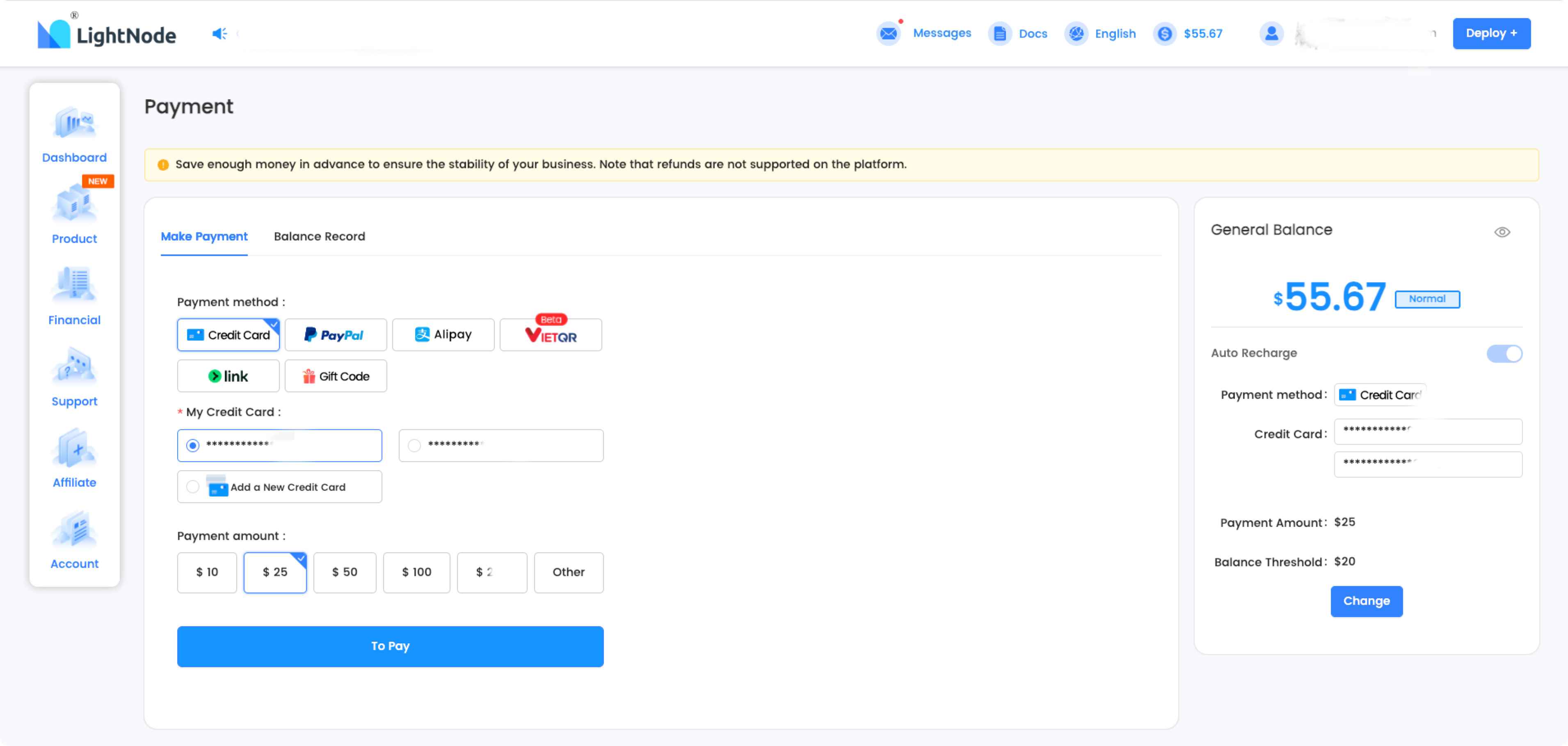
How to Enable Auto Recharge (Takes About 10 Seconds)
1️⃣ Go to Financial → Payment
2️⃣ Enable Auto Recharge
3️⃣ Choose credit card → Set recharge amount + threshold → Submit
For example:
- Threshold: $20
- Recharge: $25
When your balance ≤ $20, LightNode auto-adds $25 for you.
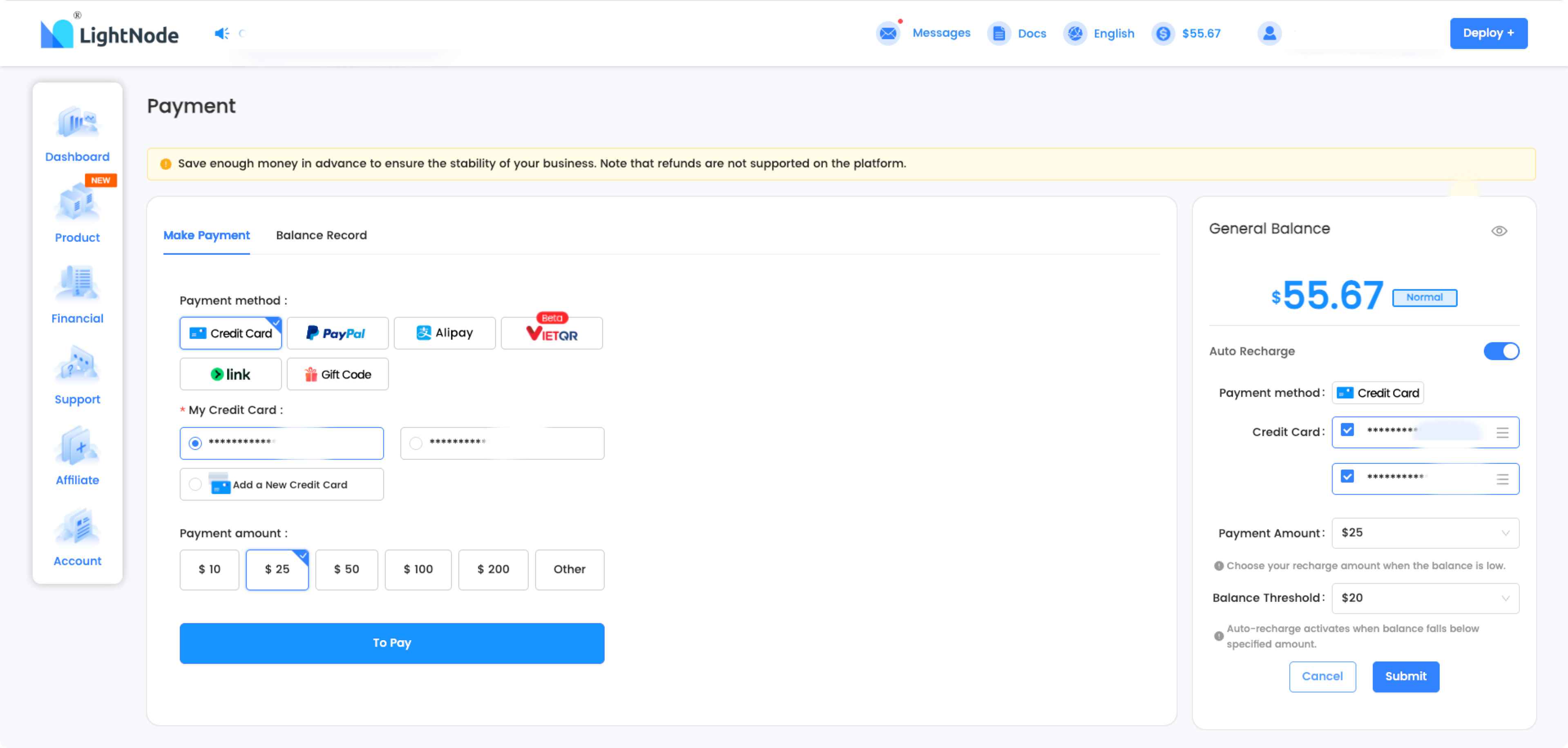
Link Payment Now Available — Faster and Smoother Checkout
In addition to Auto Recharge, LightNode has added Link Payment, expanding its payment ecosystem.
Currently supported payment methods include:
- Credit Card
- PayPal
- Alipay
- Gift Code
- Link (New)
What is Link?
Link is a fast and secure payment solution by Stripe.
Benefits:
- One-click fast checkout
- No need to repeatedly enter card info
- Strong security
- Great for frequent recharge users
Simply put:
👉 Link doesn’t replace your card — it just makes using it safer and faster.
What These Updates Actually Mean (User-Centered Perspective)
👍 Real Advantages
- Prevents unexpected service interruptions
- Especially useful for 24/7 workloads
- More payment flexibility
- Link makes topping up simpler
- Dashboard logic feels clearer and more organized
👀 Things to Note
- Auto Recharge currently mainly supports credit cards
- VietQR still in Beta
- Most valuable for long-term LightNode users
Who Benefits the Most?
- Cross-border & eCommerce site owners
- Discord bot & Telegram bot users
- AI platform deployment users
- SaaS developers
- Always-online project owners
In short:
This isn’t a “flashy” update — it’s a genuinely useful one that reduces friction and risk.
Independent Verdict
This update isn’t dramatic — but it’s meaningful.
LightNode has already been strong in pricing, performance, and global availability.
Now, by improving payment usability + service stability, it takes a real step toward becoming a more polished, mature cloud platform.
If you already use LightNode:
👉 Turning on Auto Recharge is highly recommended.
👉 Link payments are worth trying if you recharge frequently.
FAQ
1️⃣ Is Auto Recharge mandatory?
No. It is optional and must be manually enabled.
2️⃣ Does Auto Recharge support PayPal or Alipay?
Currently, it primarily supports credit card. Future expansions remain to be seen.
3️⃣ Is VietQR ready for production?
It is clearly marked Beta, meaning early users can try it, but stability maturity is still being evaluated.
4️⃣ Can I customize the trigger threshold and recharge amount?
Yes — both values are completely configurable.
5️⃣ Will Auto Recharge charge unexpectedly?
No. It only executes when your balance drops below your defined threshold, and you can disable it anytime.